Quick Trick: Curses… That Cursor!

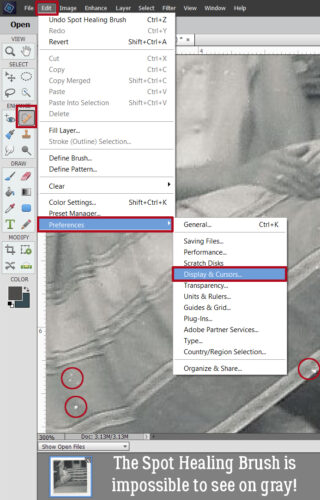
Today’s Quick Trick is a touch self-serving, but I can’t be the only one who has old eyes… My mom turned 90 on Sunday and I wanted to surprise her with my favourite black-and-white photo of her, taken in 1963. But it was COVERED in dust specks, and I couldn’t leave it like that! So I opened it up in PSE to fix it. Well. The Spot Healing Brush cursor has become completely invisible to my rapidly declining eyes when the background is any shade of gray and I soon had a headache from trying to see it. There’s a little trick that can help locate it – using the space bar to change the cursor momentarily to the Hand Tool – but it’s very momentary, and if you try to move it, POOF! I needed a better solution, so I did a web search. The results weren’t encouraging… there’s no way to change the colour of the cursor, which would have been perfect. So I tried some of the suggestions people offered. Changing the “pointer” settings in Windows didn’t do anything useful, but I did find something that worked, sort of. I’ll show you what I settled on.
Oy, these screenshots don’t show well here. So I’ll narrate. I clicked Edit>Preferences>Display & Cursors… to access the cursor settings.
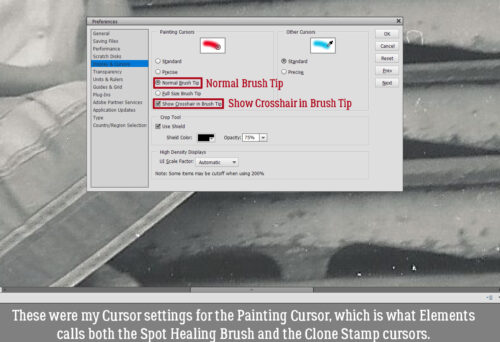
These were the settings I was working with for the Painting Cursor, which is what Elements classifies both the Spot Healing Brush and the Clone Stamp. These settings were Normal Brush Tip and Show Crosshair in Brush Tip. That setting appears as a circle with crosshairs inside it. It shows up well on white – it turns black and pops nicely – and black, because it’s white. But any shade of gray and it’s totally invisible to me.
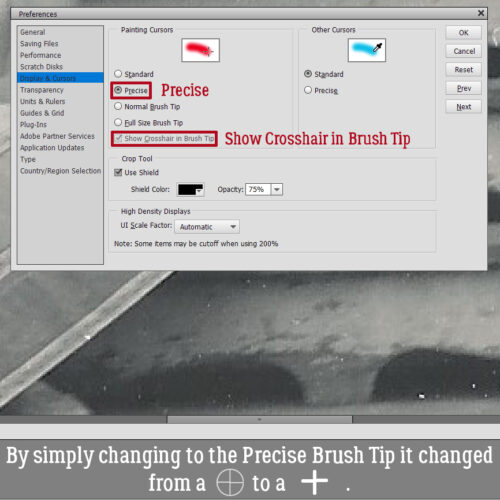
I tested some other options and didn’t like the ones that use an eye-dropper icon. When I switched to Precise and left the Crosshair box ticked. the cursor changed from that faint circle with the crosshairs to just a plus sign, but it was infinitely more visible even against most shades of gray. The one drawback is that the SIZE of the Brush Tip isn’t obvious with this setting. The Shield will appear when you click the Brush over a spot, and you’ll have an idea of size that way. I can live with that.
I will be writing a Lasso-vs-Magic Wand Selection post for you, but I’ve discovered I’ll need more time to prepare it than I expected. Since my husband’s eye surgery I’ve been doing all of our son’s care and transfers in addition to all of my own usual tasks, so I haven’t had a ton of spare time. He has another follow-up with the ophthalmologist on Thursday and hopefully will be cleared to get back to normal. Watch this space!

Great tip !! Thank you 🙂