Designer Spotlight: July 2026 – Part 2

Cindy Ritter Designs

Are you all recovered from yesterday’s bisesquicentennial celebrations? (That’s 250, if you’re furrowing your brow.) We did our part and had hotdogs for dinner last night. šŸ˜‰ If you’re wondering, we had homemade poutine for Canada Day. šŸ˜€

Cindy and I had a little visit recently; it was lovely chatting with her again. We did squeeze in some business talk at the beginning and then got on to the fun stuff.

J: Cindy, tell me about how you chose your designer name and logo.

C: The name is simple enough, but if you look closely you’ll find a zebra hidden in my logo. The zebra is the mascot for people with rare medical conditions. I have 3.

J: Ah yes, the old “when you hear hoofbeats, think horses and not zebras”, or “common things are common”. I’m sure there are a bunch of our readers who have walked the same path, having their symptoms downplayed and their concerns ignored before finally having a diagnosis. I see you. I feel you. <screech> Back to business. Do you have a favourite colour or palette that you like to use for your designs?

C: I love the colors of summer! Warm, sunny, happy colors. Green, yellow and orange are my favorite colors.

J: There was a lot of smoke in the air last night from a wildfire some distance away, so everything took on a warm, red-orange glow. That’s what summer here usually looks like. It’s still early in fire season, and we’re holding our own for now. Now, what are the 3 design tools you never want to be without?

C: Photoshop, Acrylic paint, scanner.

J: Your use of paint sets you apart a bit from most other digital designers. It’s something I appreciate about your collections. Has your approach to designing evolved over the years?

C: I’ve fallen in love with the Art Journal style and love making really artsy, messy, unique designs filled with color and feeling.

J: I feel like getting it right with Art Journaling is a real skill. Good for you! It must be quite therapeutic too. Do you have a favourite kit or collection? One that makes you really proud?

C: I’m torn between “Not Today” (hyperlink!!) and “Reflections” (hyperlink!!) -both are part of my personal journey to mental wellness. Art therapy in digital form.
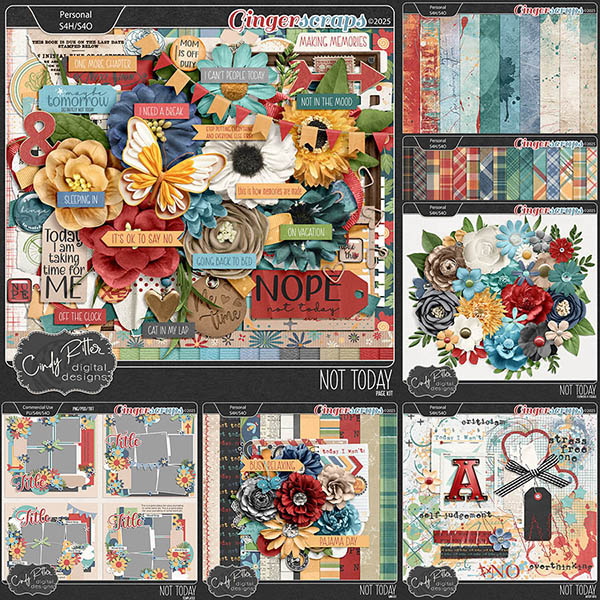
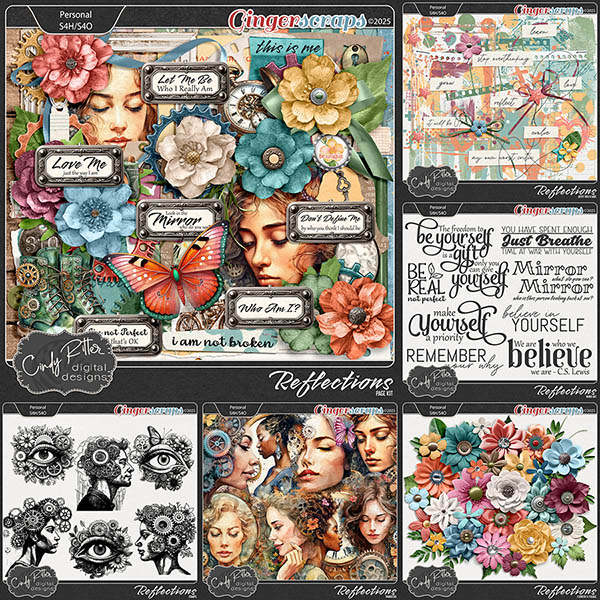
J: Well, I have BOTH of those collections in my stash, so clearly I agree with you! So, they both lead to this: if you could instantly acquire a new skill, what would you want it to be?

C: How to let myself relax and be comfortable with not being productive.

J: Oh… you must be an eldest daughter. I SO relate! I sometimes wish I could just switch places with my husband, who happily amuses himself for hours without giving a thought toĀ things that must be done. Or become one of those Real Housewives who sit around gossiping all day. It’s just not how I’m made. But hey, if you could live in a fictional universe – let’s face it, RH is a make-believe world – which would you choose?

C: That’s easy! Discworld!

J: Lemme just look that one up. <plays intermission music> Okay, I can see the attraction! Who wouldn’t want to have magical powers? The premise sounds like it was built on North American aboriginal beliefs. Fascinating! If you had the magic, and could teleport anywhere, whare would you go?

C: A remote tropical island. I need a vacation!

J: Hmm. Yeah! Maybe if you had the chance you could take up paragliding! I remember you mentioned wanting to try it. I don’t like heights, so it would be a hard pass for me. You know those silly social media quizzes like “how many of the things on the list have you done”? I can usually check off most of them. The ones I’ve never done include paragliding, ziplining, bungee jumping… there’s a definite theme. I’m not much of a daredevil, but I have done some… um… risky things in my life. And eaten some odd things. What’s the weirdest food combo you’ve ever partaken of?

C: Green olives & Jelly Belly jellybeans. I was pregnant. šŸ˜€

J: I just had a handful of Jelly Bellies before we sat down. Without the olives. Were you peeking? Thanks for the chat, Cindy! I’m just going to wrap things up and check on my friend’s cats – I’m cat-wrangling while she polices the World Cup events in Vancouver. Have a great Spotlight month, Cindy!

M’kay. Of course, Cindy‘s hosting the other of the July Designer Spotlight Challenges, and also of course, providing us with a Daily Download kit. I hope you’ll check out her store, since it’s on sale this month AND she has a coupon code too!
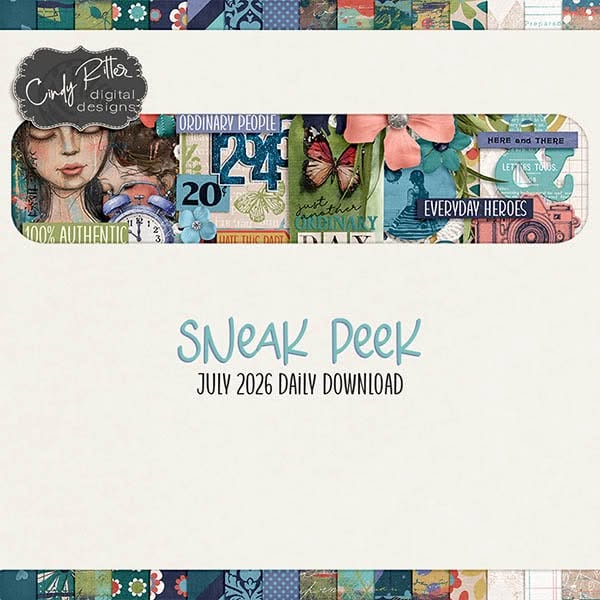
What are you waiting for? Go check it out!

Designer Spotlight: July 2026 – Part One

Designs by Lisa Minor

July. Already. Oy!! Half the year is gone. But I must say, things chez Jan are better now than they were this time last year, so I’m okay with time flying. I guess. Anyway… this month we have two Designer Spotlights. Part Two will appear on Saturday if all goes well. šŸ˜‰ Because Lisa was a true early bird, visiting me back in May, she has the first spot. šŸ˜€ We decided not to talk much business this time, and went right for the fun. Check out Designs by Lisa Minor! <hyperlinked – look for the coloured, bolded, underlined text!>

J: I hope you don’t mind that I have some music on in the background, Lisa. I like a little something to drown out the golfer profanity from the second tee. We could sit on the deck, but some of those golfers lack manners and have weak bladders. ;( Nobody wants to see that! But on the topic of music, if you have a theme song, what would it be?

L: Good Riddance by Green Day

J: Hmm. There are so many ways one could take that. Green Day does have some accurate insights though. I think mine would be something by Ashley McBryde. Maybe Light on in the Kitchen. The people in her songs might be fictional, but I think we all know somebody that fits the profile. If you could spend a whole day with a fictional character, who would you choose?

L: Wolverine, but only if it’s Hugh Jackman all dressed up.

J: Ooh, he’s fiiiiiiine! I loved him in Real Steel (which I’ve watched far too many times), and The Greatest American Showman. Mad acting skills! But speaking of skills, we should talk a wee bit about design. Right? Do you have a favourite holiday or season to design for?

L: Spring. I love that everything around that time of year feels so fresh and new.

J: I love spring too, watching my garden waking up and seeing the birds return. Those rituals are comforting. Do you have any traditions or rituals you follow when starting a new collection?

L: I have a form that I fill out for each kit, so that anytime I think of an idea or get inspired by something, I can jot it down.

J: Oh, smart!! I’ve developed some routines for creating my tutorials, and for how I construct the other Blog posts I’m responsible for. It really helps to have that process. I’ve really enjoyed the tutorials, since they’ve pushed me to learn a bunch of new ways of looking at things, picking up new skills along the way. Is there some skill you don’t already have that you’d like to learn?

L: Honestly, EXCEL. I’ve taken the public classes, and I still use it with the skill of a Kindergartener.

J: Urk. No. Not me! I feel like it’d be teaching an old dog new tricks and I kinda like retirement. Although… it would be more fun if I had a younger body. Even just for a week. If you could be any age for a week…?

L: 30. Honestly, I would love to be 30 again and know everything I know now!

J: That would be AMAZING! There are so many things I’d do differently. I’d make sure I had more fun. Have you ever played a really great prank on someone? Or had one played on you?

L: I put Kool-Aid Mix in the shower heads at a women’s retreat. It was RED and did not go over well when they turned their showers on.

J: OMG. I just had a mental image of the prom scene in the Sissy Spacek movie Carrie. I think you know the one I mean. Can’t understand why they’d be irked. šŸ˜€ I’m guessing you weren’t invited back. Too bad you couldn’t have turned into a bird or something and gotten outta Dodge. If you could swap places with any animal for a day, which one would you choose?

L: A Sloth! I would love to be able to turn my brain off and just sleep.

J: I can definitely relate!

L: I could stay in pajamas, all day every day.

J: SAME! But my son’s Handi-transit bus driver might have questions. No visits from the RCMP please… especially now that I have a family member at the detachment. šŸ˜‰ Which reminds me, I have a housewarming card halfway constructed. Car making has become my number one hobby. Is there a hobby you wish you had taken up?

L: Crochet. I wish I had paid more attention when my Grandma did it. My daughter taught herself and does a pretty good job!

J: Hmm. I can teach you! Do you think my daughter would like me to crochet her a housewarming afghan? HAHAHAHAHAHA! That would be a hard pass. Lisa, thanks for the chat! I’ll fill our readers in on what you’ve got going on for your Designer Spotlight and then I really do need to finish that card before it’s time to make dinner.

As usual, Lisa is providing us with a Daily Download kit.

And she’s one of the Designer Spotlight Challenge hosts. To make it even more awesome, she’s done this!

And before I forget, she also hosts the Pinterest Challenge each month. Check it all out! So many opportunities…


Tutorial Tuesday (Photoshop Elements)

Zen Doodling Wrap-Up

Once again, Best Laid Plans were scuttled… but this WILL post before Tuesday is over. Thanks for the grace you all provide me, it’s deeply appreciated!

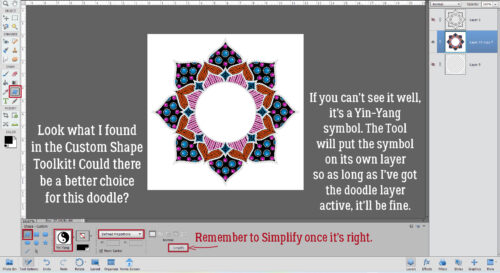
I’m finally wrapping up that Zen doodle project. Have you guessed what I put in the centre? Let’s see! This is where we ended last time. I acted on a hunch and took a look at the Custom Shape (aka Cookie Cutter) library. Whoa!! There’s a Yin-Yang symbol in there! To ensure it’s an actual circle, I selected Defined Proportions, which defaults to 1:1 and dragged out a symbol. Elements puts these shapes on their own layer, so once it’s been Simplified, it’s easy enough to resize and reposition.

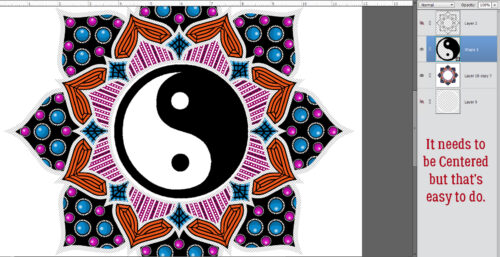
As you can see here, I have a doodle layer, a yin-yang layer and a black outline layer that has a Cloak of Invisibility on it at the moment. Centering an object is simple: activate the two layers (doodle and yin-yang) then Align to both Center and Middle.

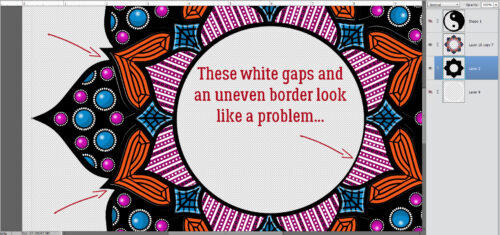
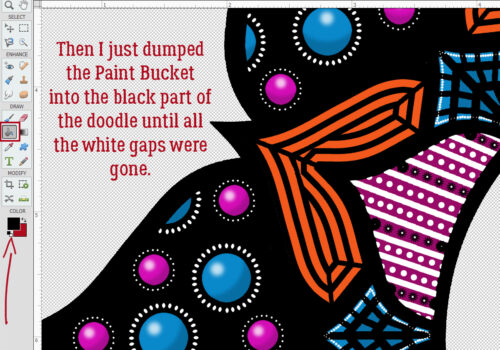
I should point out that the Brush I used for the basis of my doodle isn’t perfectly symmetrical. So when I Duplicated finished segments and moved them into place, they didn’t fit precisely over their spots. That means I have some… gaps. But… moving the black outline layer down to the bottom of the stack and Filling it with the Paint Bucket didn’t make them go away. What to do?


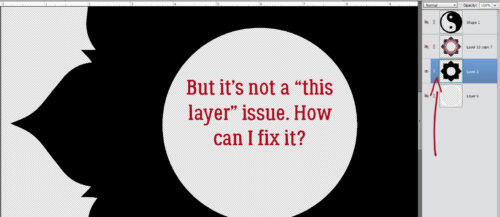
First I had to figure out where the problem actually existed.

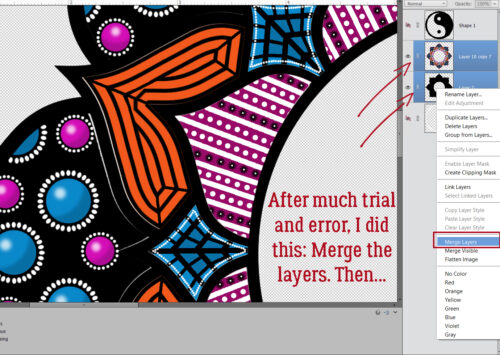
I tried a *few* things that didn’t work. Then I Merged the doodle and black background layers together.

Then I just dumped black Paint until the gaps disappeared.

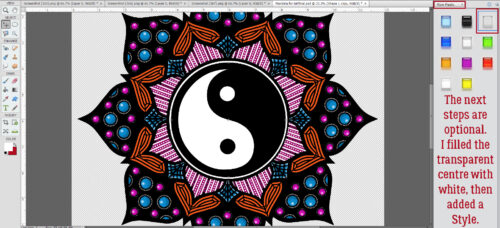
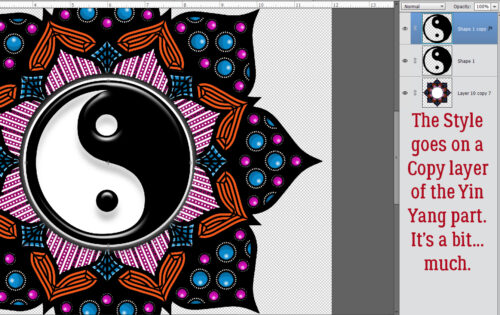
Other than Filling in the centre of the doodle with white, the remaining steps are completely optional. I wanted some catchlights and a bit of dimension so I went into the Styles menu and chose Wow Plastic. It’s one of Elements‘ core Styles that is part of the basic software. The one I’ve outlined in the screenshot is a CLEAR plastic Style so the colours below it will be unchanged. But… if you apply it to the actual doodle or yin-yang layer, the colour will disappear. So… Copy Layer it is!

It’s not really obvious in the screenshot, but the effect is a bit much. Too much. So I’ll adjust it.

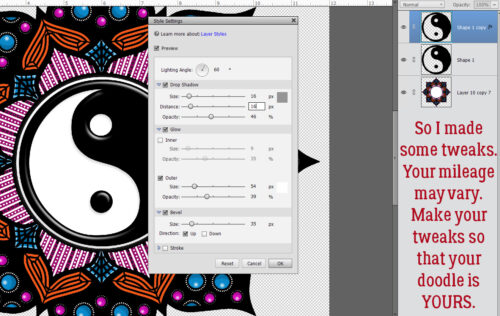
This is a good skill to develop. You can pretty much always make adjustments to Layer Styles. And you can see what you’re doing as you do it, which really helps. To get into the Style Settings menu, double-click on the fx icon on the right side of the Layer.

I changed the Lighting Angle to 60°, tweaked the Drop Shadow Size and Distance to 16 pixels each, lowered the Opacity to 46%, set the Outer Glow to 54 pixels at 39% Opacity and decreased the Bevel to 35 pixels. That gives it a nice 3D look without being overpowering.

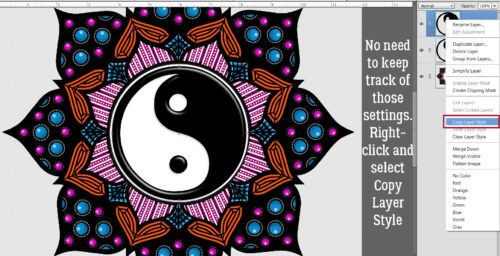
I think I’ll apply the same Style to the rest of the doodle. I don’t need to remember what those settings were, I can just Copy Layer Style to Paste it onto the doodle. But not THE doodle… a Copy Layer. To Copy the Style, right-click on the Styled layer and choose Copy Layer Style from the dropdown.

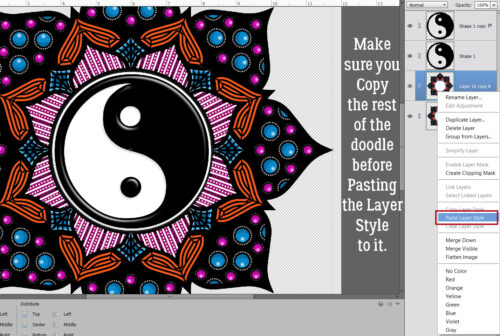
Making sure you’re on the Copy of the doodle layer, right-click again and select Paste Layer Style and Elements will apply those same settings to the doodle.

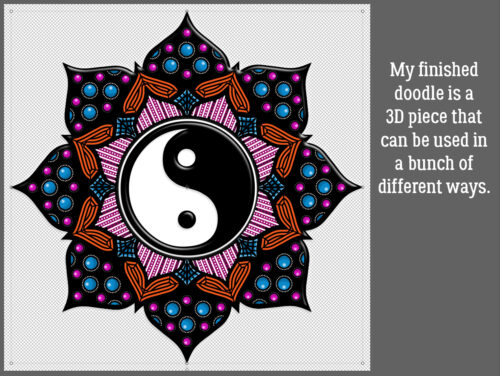
I Saved my doodle as a layered PSD file so I can make other adjustments when I decide to use it for a card or a layout. It can be a background, a frame (pop a photo into the centre instead of a yin-yang) or even a 3D element. For those purposes I’d want to Save it as a PNG file so the transparent background is preserved.

Now, you may NEVER attempt digital Zen doodling, but these techniques can be put into play in so many other ways. Don’t be afraid to experiment!! If something doesn’t look like you want it to, just Undo [CTRL/CMD>Z] as many steps as you need to (my fingers just find that keyboard shortcut naturally, from so much practice) and try something different. All you’ll lose it a bit of time. šŸ˜‰

I’ll be back on Thursday with a July Designer Spotlight. Care to guess who that might be?

Happy Canada Day to all the Canucks out there. And happy 12th birthday to my first grandchild, Jonathan.


Designer Spotlight: June 2026

Aimee Harrison

Aimee and I didn’t manage to squeeze in a chat… too much on the go for both of us. But I decided I really should do at least a little blurb for all the Designers with whom, for whatever reason, I don’t get to chat with – instead of just not doing anything. From today forward. šŸ˜‰ And I’m late-ish today, having spent the morning at Urgent Care. (Nothing to worry about, just one of those old-lady problems that needed to be promptly addressed.)

Of course, if you’re here, you know Aimee is providing the June Daily Download, and can collect all the mini-files that make up the full kit.

You can find her Store here.

Aimee is hosting the Designer Spotlight Challenge as well as her usual Color Challenge. Give them a look!

I don’t have a coupon code for you today, but it looks like most of Aimee’s Store is currently 50% off. (Bundles and some Styles are excluded.) Aimee is one of my favourite Designers, so I highly recommend you check out her deals!!

Designer Spotlight: April 2026

Twin Mom Scraps!

Before I get started I’d like to apologize to Rebecca (Twin Mom Scraps) for the great delay in getting this port written. It’s been rather chaoticĀ chez Jan et al the last week or so; every time I sat down to compose my thoughts, somebody or something interrupted me. And my new glasses are… not right. I have another appointment tomorrow to get that sorted out. šŸ™ Anyway…

If Rebecca seems familiar, it’s because she’s a Spotlight frequent flier! Here’s something you might not know about her: her mom Lydia was the lead Sugar Cookie for a long time before her health led her to step down. She was also my friend. Lydia left this world 2 1/2 years ago and she’d dearly missed. Now, onward!

J: Rebecca, how nice to see you again! What wonderful little snippets do you have to share with us this time? Given that I’m way behind with this conversation, tell me how you keep track of all the things, between designing, personal life, and other commitments?

R: Lists! And more lists! I use a google calendar which keeps track of all my recurring responsibilities, upcoming deadlines, etc. It has really helped keep me organized.

J: I use lists too, but for some reason, my process has fallen apart. Good for you staying on top of it all! So, tell us about your favourite part of seeing our GingerScrappers using your designs?

R: I love seeing the versatility of my designs in layouts. It’s flattering to see a really beautiful page!

J: I like thinking outside the box with my scrapping, (not that I’ve done much of that lately!) and using kits for layouts that are really off-theme. It’s fun! When you’ve finished a big collection, do you have a ritual celebration?

R: Nope! I start the next one!

J: I’ll have to start calling you Queen of Hustle! šŸ˜‰ What do you do to unwind from all that busyness?

R: Some eyeball reading on my beloved Kindle!

J: Me too! My Paperwhite is starting to show ghosts of books past on the screen behind books present, but I don’t want to replace it yet. I like it because it fits in my purse. Do you have anything… unusual in your purse or pocket?

R: A painted rock – I found it the morning after my Dad passed away, and have carried it with me ever since.

J: That must bring you a lot of comfort. I remember when your dad passed. I don’t have anything sentimental like that in mine, but I do have a screwdriver and a multitool. šŸ˜€ I like to be prepared. My dad loved pizza, so whenever we eat it, I think of him. That’s my painted rock. šŸ˜‰ Do you have a specific comfort food for those moments when you really need to feel better?

R: Really, anything sweet!

J: A gal after my own heart! But I’m trying to keep my hemoglobin A1C in the green zone, so I’m cutting back. I think it’s working, because I’ve lost 17 pounds. What would you choose if you could only eat one food for the rest of your life?

R:Ā Probably pasta

J: I love pasta too, but I don’t think I could eat it every day. Did you know that if you chill pasta before you eat it, then reheat it, the carbs aren’t as readily converted to sugar? PSA for the day, <snicker> I need some new clothes; do you have an outfit or item of clothing that you’d be happy to wear every day?

R: I’m happy as long as I’m wearing flip flops.

J: SAME! We had a really mild winter and I’ve been wearing mine for a couple of weeks already. It messes with my brain to be outside with bare feet this early in the year, but I’ll cope. It’s been a lot of fun taking note of all the early migratory bird arrivals. I’ve been a birdwatcher for my entire adult life, and I’m learning to identify bird sounds too, using the Merlin app on my phone. Is there a hobby that you’ve always wanted to try but just haven’t yet?

R: I would love to learn how to make pretty soaps…I get stuck watching videos on Tik Tok and it’s so relaxing

J: I watch card-making videos on You Tube while I’m brushing my wheaten terror (not a typo) and the two together really relax me.

R: I would definitely switch places with one of our dogs…they are living their best life, like they pay rent

J: Right?? Well, I’m not going to keep you yakking because I know you’ve got irons in the fire. I’m going to fill our readers in on all the big plans for your Spotlight month (what’s left of it) but first, I want to wish you an early Happy Birthday! Now, back to business…

Rebecca is, of course, the provider of this month’s Daily Download. Here’s a sneak peek.

She’s so generous, she also has a Fan Club Freebie on Facebook! Click on the link!!

But wait!! There’s more! Because in addition to her regular Memory Mix Up Challenge, she’s also hosting this month’s Designer Spotlight Challenge. And if all of that isn’t enough…

ANDDDDDDDDDDDDDDD!

Sp what are you waiting for?? Go shopping, get scrapping!!


Tutorial Tuesday (Photoshop Elements)

Digital Zen Doodling (Part One of ??)

When I embarked on this endeavour, I had no idea how quickly it would run away with me! I looked at the screenshots I’ve compiled so far and knew immediately this would have to be a multi-part tutorial. It’s really not that complicated, and once you get the steps down in your mind, it goes fairly quickly, but there is a learning curve. I’d call this an intermediate-to-skilled technique, but I do think with some experimentation, it’s achievable by all. So let’s get into it.

It’s been awhile since I posted a new, detailed tutorial so I’ll just make some pre-departure announcements. I make no assumptions regarding the level of expertise my tutorial readers may have. They’re written in deep detail so that even a beginner can follow along. If you’re a rockstar digi person and already know how to accomplish something, I’m not going to know if you skip that part! For keyboard shortcuts, I will always include both Windows and Mac commands; I use Windows so it always goes first. Any time you see coloured, bold, underlined text, that’s your signal that there’s a hyperlink there. And finally, any conversion to PDF format is a Ginger job. I don’t want to use any app or software that could create problems for her business, so that’s the work-around we came up with. Now, back to creating!

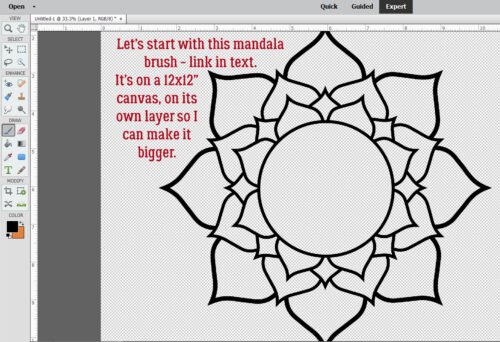
What better place to start a Zen doodle project than with a mandala? I found a set of free mandala Brushes at Brusheezy and downloaded them. You can get them here. I chose this particular one for its large areas just crying out to be filled. These Brushes are 2500×2500 pixels at their largest, so I put the Brush on its own layer so I can make it fill my page. One thing to know about Brushes: they aren’t “vector” images so they have some jaggedy edges when you Zoom in, but don’t worry, I’ll show you how to hack that.

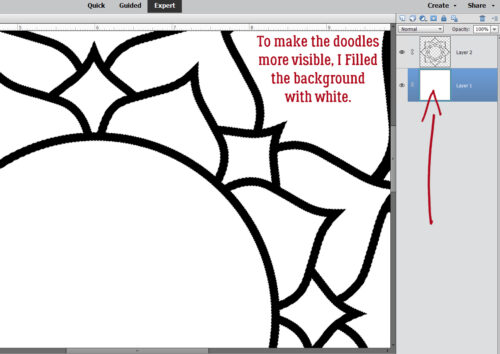
I realized I’d need a solid background to make the actual doodling part easy to see. So I Filled the background layer with white.

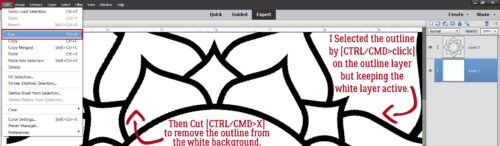
I wanted to isolate the various shapes to make doodling in them easier, so with the white background layer active, I CRTL/CMD>clicked on the brush layer to Select the outline of the mandala. Then I just Cut the mandala outline out of the background: Edit>Cut or CTRL/CMD>X.

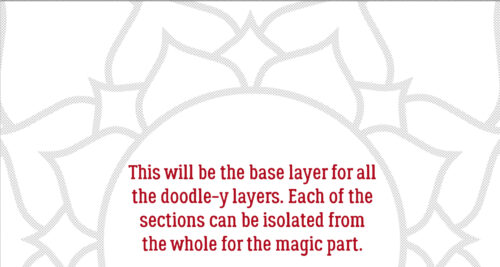
I turned visibility for the outline off and this will form the basis for all the doodle-y layers. I can use the Magic Wand to isolate any of the cells in the mandala from the rest, jaggedy edges notwithstanding.

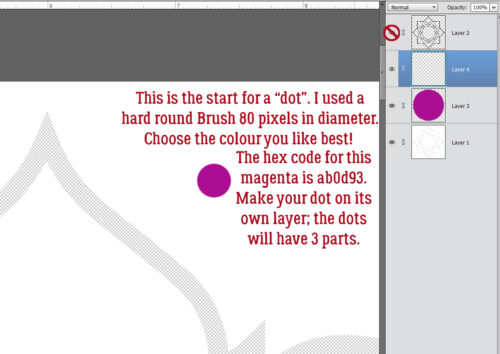
Zen doodling usually involves lots of dots of various size and colour. So the first thing we’ll do is create a 3D dot! Things like colour choice and image size are completely within your control – my stuff is simply for guidance. That said, I used a pretty magenta colour as my base. The hex code for it is ab0d93 if you’re a fan. I chose a hard round Brush from the integrated Basic Brush set in my version of PSE, sized it to 80 pixels and clicked it on its own layer. We want to be able to Duplicate these little elements so they need to be built up then Merged. You’ll see what I mean.

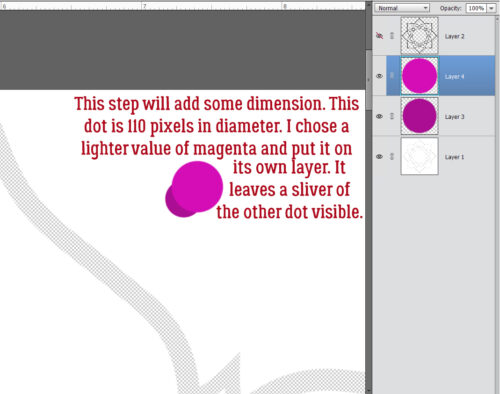
I wanted my dots to have a domed look, so I played around until I figured out the easiest way to do it. I went back into the Color Picker and lightened up the magenta a bit. Then I enlarged the Brush to 110 pixels and clicked it on its own layer at an offset so that it overlaps the darker dot with only a sliver of the darker dot visible.

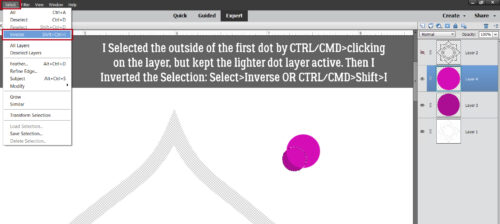
Your eyes are going to start glazing over when I talk about Selecting edges, and once you know how to do it, you can skip ahead. šŸ˜‰ With the lighter coloured layer active, I CTRL/CMD>clicked on the darker coloured dot layer to Select the edges of that smaller dot. Then I Inverted the Selection: Select>Inverse or CTRL/CMD>Shift>I

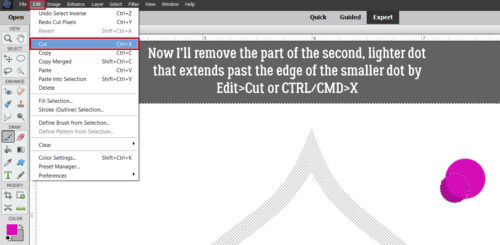
To remove the part of the larger, lighter dot from where it extends past the edge of the darker, smaller dot, Edit>Cut or CTRL/CMD>X

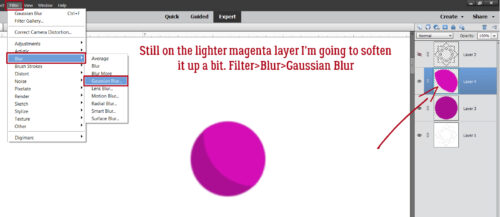
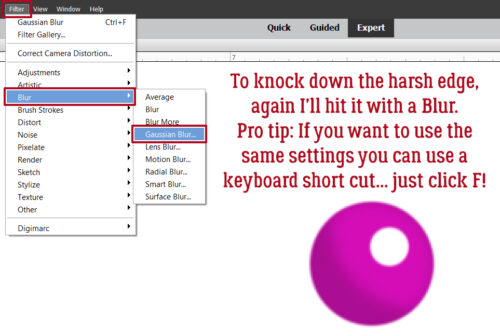
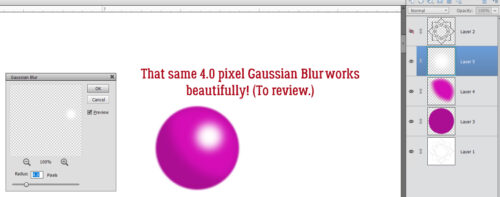
It looks a little harsh, so I’ll soften up the lighter area using a Blur. Filter>Blur>Gaussian Blur

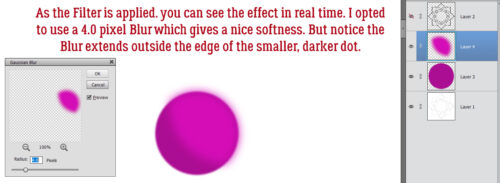
It’s cool that as the Filter is applied, the result is visible in real time. After some dithering, I decided that 4.0 pixels was the right amount. But now the lighter magenta blur sticks out…

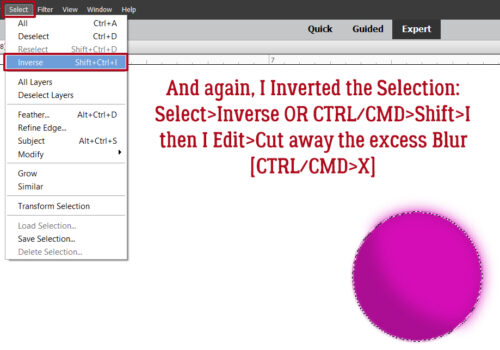
So I Selected the edge of the darker, smaller dot AGAIN, and Inverted it AGAIN with the lighter layer active so I could cut away that overflow.

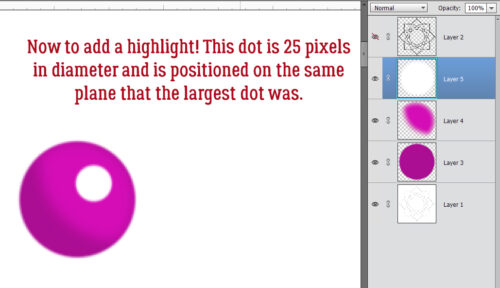
Now it needs a highlight! I added a new layer to put a 25 pixel white dot onto, positioned at the same angle as the middle layer.

It’s too harsh, so I’ll use that Gaussian Blur again. Here’s a Pro Tipā„¢: as long as you haven’t made any setting changes since the last time you used a Filter, you can just click the F key and it’ll apply the identical Filter to the new layer. Very helpful for custom shadowing!

This is a review……….

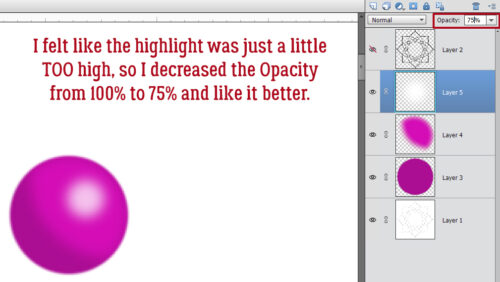
It really felt a little too bright to me, so I decreased the OpacityĀ  of the white dot layer to 75% and liked it a lot better. Gives a bit of a pearlescent look!

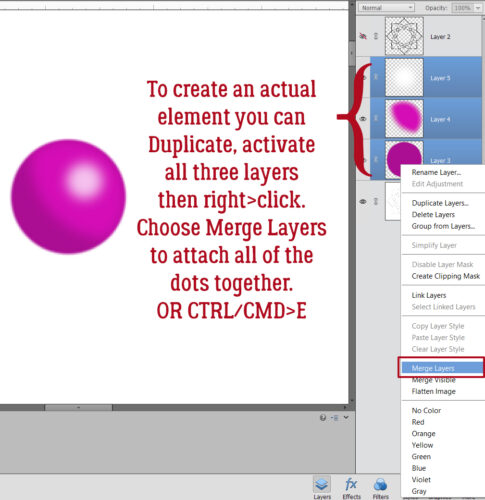
I want to be able to Duplicate this 3D dot, so I activated all 3 layers (click>shift>click on each) then Merged them: right-click and choose Merge Layers or CTRL/CMD>E

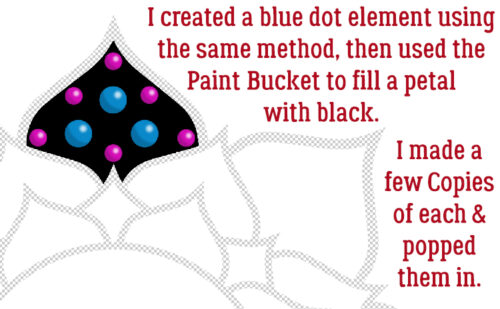
As you can see, I Filled one of the petal-shaped segments of the mandala with the Paint Bucket and black. Then I made another dot, this timeĀ  a bit bigger and with blue shades, Copied (CTRL/CMD>J) them all a few times, then distributed them inside the black petal. Don’t be too concerned with perfection here! Zen doodling done with ink, marker or paint is never going to be exact. Eyeballing is all good!!

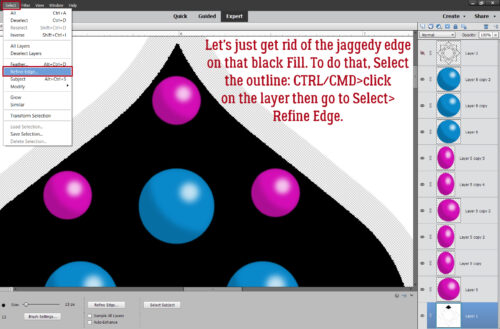
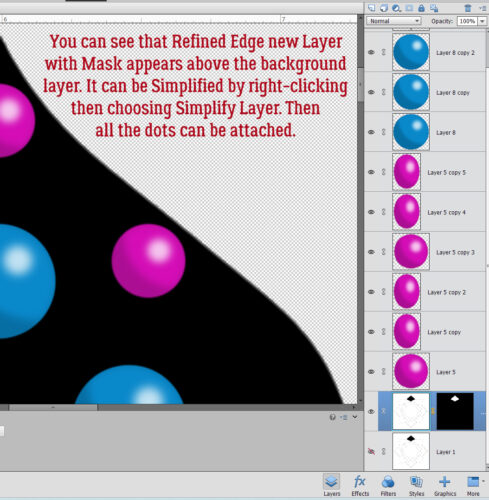
Remember those jaggedy edges on the mandala Brush? Let’s deal with that now before we move on to the next phase. Select the edges of the black petal: CTRL/CMD>click on the layer, then go up to the tabs. Select>Refine Edge. The screenshot below shows that the black segment is on the main, background layer and each of the coloured dots are above that in the Layers Panel.

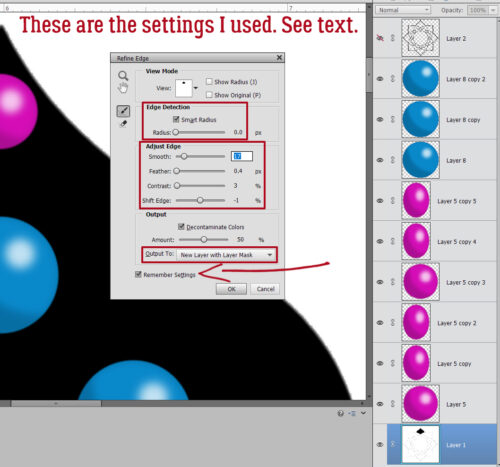
This menu pops open. Some of the settings you see are defaults, and as you adjust the sliders, you can see the effect in real time.

Edge Detection: Smart Radius>0.0 pixels

Adjust Edge: Smooth>17Ā  Ā Feather>0.4 pixelsĀ  Ā Contrast>3Ā  Ā Shift Edge> -1

Decontaminate Colors: Amount>50%

Output to: New Layer with Mask

Remember Settings

Make sure to Simplify the new layer so it can be Duplicated! Right-click on the layer then choose Simplify Layer.

That’s where we’re going to stop for today. I want to keep the screenshot load to a manageable number; 20 (plus the starter) is good for today. I’ll pick this back up next week as we create a Zen doodle trademark ring of white dots around each 3D dot!


Designer Spotlight: March 2026

Magical Scraps Galore

Yes, you read that correctly. Marina, aka Magical Scraps Galore, is once again in our Spotlight! But don’t worry, there’s still lots to learn about her. Let’s dig in!

J: Marina, it’s clear that you’re happy here at GingerScraps, since you’re taking on the responsibility of Designer Spotlight again so soon. What is it about the GingerScraps community you enjoy most?

M: GingerScraps is such a wonderful, welcoming and supportive community that feels like family to me. And it’s a wonderful place for us designers because we don’t just sell products, we build relationships with scrappers. And Ginger is the best!

J: That’s exactly how I feel too. I’ve always felt like GS is home, ever since I first jumped in back in April of 2013. And of course, Ginger is brilliant and generous to a fault. We have a special cadre of Designers too, who make digi-scrapping a real pleasure. What inspires your creativity when you’re beginning a new kit?

M: I’m mostly inspired by the photo gallery on my phone. I always design collections that I can personally use.

J: I’m almost afraid to look at the gallery on my phone… I take way too many sunset photos, and I save at least ten times the project ideas I could ever use. I’ll never suffer a lack of inspiration, right? Do you have a favourite theme or occasion to design for?

M: My favorite theme is traveling, it gives me an excuse to visit new places to do some research and find inspiration.

J: So, how many times have you been to a Disney park, again? šŸ˜› Ignore me… What about seasons or holidays? Do you have one that lights you up more than others?

M: I love designing winter and fall collections; I guess it’s because I’m drawn to winter and autumn color palettes.

J: I thought I saw a new winter collection in your store! I’m drawn to those palettes too, and part of me is sad that we really haven’t had winter this year. Another part of me is kinda happy, because my hubby has had lifting restrictions for several weeks, and I would have been on shovel duty. šŸ˜‰ Do you have a kit or collection that you’re especially proud of?

M: Can I pick two?

J: Of course!

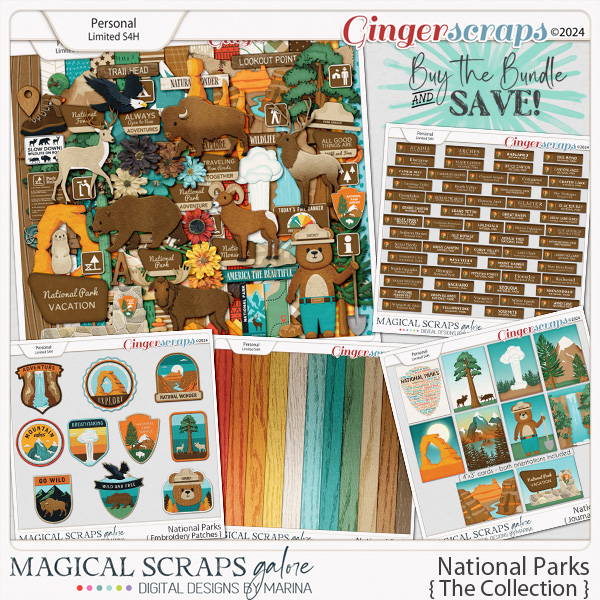
M: My most special collections are ā€œHistoric Route 66ā€ and ā€œNational Parksā€. I did a lot of research for both and I included lots of unique elements that I specially created for them. And they bring back amazing memories of my road trips.

J: Oh, I see why you love them! What are your three go-to tools for designing?

M: Photoshop, Illustrator and Procreate.

J: I feel like the learning curve for those three is pretty steep. I’ve watched a bunch of Photoshop YouTube videos to see if I can transduce them down to Photoshop Elements, and usually I just end up with a headache! So I default to either cooking shows or card-making videos. Those I can follow. šŸ˜› What’s your favourite way to unwind?

M: I take a long shower, jump into bed and watch my favorite series.

J: Sounds so lovely! I can’t shower in the evening – it makes it hard to get to sleep. But maybe I should try it again. Maybe age has reset things? I also can’t eat in the evening any more, which is good for my waistline but not so good for my mental health. I enjoy a good dill pickle chip from time to time. šŸ˜€ If you were only allowed to eat one thing for the rest of eternity, what would you choose?

M: Spaghetti and meatballs with tons of parmesan!

J: Mmmm! Pasta! I watched my husband devour a huge plate of spaghetti and meatballs at the Old Spaghetti Factory recently… while I ate a salad. šŸ™ Then he needed a nap. šŸ˜€

M: I’d love to swap places with one of my cats; I’m jealous that they get to sleep all day and get tons of love from me, LOL.

J: Looks like we missed National Spaghetti Day – it was January 4th – but we could still make National Meatball Day… it’s March 9th! Do you have a favourite random “holiday”, like one of those?

M: National Cat Day, since I get to give my kitties an extra dose of cuddles.

J: Unless you make EVERY day National Cat Day, you’ll have to wait awhile – October 29th. I’m not a cat person, so thank you for leaving them home. <snicker> Before we go, I’ll give our readers all the rest of the scoop. Marina has created a very sweet Daily Download for us, so make sure you check in here at least every couple of days to collect the pieces. Here’s a sneak peek:

She’s also hosting one of the two Designer Spotlight Challenges this month in addition to her monthly Surprise Challenge. Oh, and she’s giving everybody 30% off!!!

If that doesn’t get you into her store, I don’t know what will!

This month we have two Designer Spotlights; the other is North Meets South (Connie Prince and Trixie Scraps), who have chosen not to participate in the Blog Spotlight, as is their prerogative. You can find their Challenge in the Forum.

On a personal note, I received some… interesting news yesterday. I’ve been having some issues with my vision and had it checked out. I have a new posterior subcapsular cataract (not actually new, it was there a year ago, I just wasn’t told about it) in my right eye that is advancing fairly quickly.Ā  So, surgery might be needed in the next year or so. I also have an epiretinal membrane in that eye, which won’t need treatment unless it changes. I love that for me. šŸ™ But I’m getting new glasses that will make a HUGE difference and can’t wait! Stay tuned.

Designer Spotlight (February 2026)

Jumpstart Designs

This month’s Designer Spotlight is shining on Jen from J Conlon and Sons, and Sheri, also known as Jumpstart Designs. Jen hasn’t been in touch so I’m not sure if I’ll have a post highlighting her – but she IS hosting some Challenges and such, so I’ll drop that info at the end.

As you may remember, Sheri and I have known each other a long time. But she can still surprise me! We started out with the formalities, chatting about designing. What follows is a transcript of our conversation.

J: I think I know the answer to to this, but I’ll ask you anyway. What lights your design fire most?

S: Color! And sometimes I’ll get inspired by reviewing all the PINS I’ve saved on Pinterest over the years.

J: I KNEW you were going to say colour!! That’s one thing that’s always obvious when looking at your designs. There’s an indefinable quality to the way you use colour that’s very appealing. This one might take a little thought on your part. If you could only use THREE design tools for the rest of your career, what would they be?

S: CTRL-Z (undo) is my favorite Photoshop ā€œtoolā€ for sure! As for the other two…. CTRL-Z and CTRL-Z! LOL

J: <snort-laughs> My sister!! If you’ve read any of my tutorials, I mention CTRL/CMD>Z ALL the time! (I don’t discriminate – Mac commands are always included too.) I’ve found a bunch of other places it works, and use it with gusto. What does your design process look like?

S:Ā  Ā  Remember, you asked!

  • I look around for inspiring ideas
  • Think of a kit name
  • Create my preview packaging with pretty title-work. Create files for every product (elements, add-ons, papers, wordart, etc.) so they are all ready to go.
  • Start on elements (usually florals first. I love them).
  • Add to previews as I go along.
  • After about a dozen elements, I change my mind and decide the preview packaging should be a different color, so I change them all.
  • Create more elements then tweak the colors more.
  • Go back and change the preview packaging again.
  • Work on more elements. Stare at them a bunch. Tweak them more.
  • Decide maybe I should go with a different style. Re-do everything.
  • Stare at them a bunch. Tweak them more. Change previews again.
  • Eventually work on papers and other elements.
  • Go back and tweak some more.
  • Tweak the previews more….
  • And on… and on… and on… LOL
  • And about the time I FINALLY get everything done and uploaded to the shop, I noticed I messed SOMETHING up and must go back and fix everything. LOL

J: That’s very… detailed. Almost like I wrote it! šŸ˜‰ It’s interesting that you use the previews as your foundation. But it works, so don’t change anything!! So, knowing all that, what’s the most challenging part of digital designing? I mean, after all the false starts. ;D

S: The amount of time it takes me to complete a kit or collection. I’ve been told I’m too picky about little details, including how I do my previews. It’s shocking how much time I spend changing and tweaking things. I often wonder how other designers manage to put new designs out so frequently.

J: See above! Your attention to detail is a huge benefit for your fans, though. But yeah, it’s a mystery to me how some Designers are SO prolific. They have to have some kind of secret sauce or something! Wow, those noodles I ate for lunch are making me thirsty. But boy were they good! If you could only eat one thing for the rest of your life, what would you choose?

S: Anything Mexican and cheesy!

J: So, are nachos your go-to comfort food, or is there some other yummy thing you love?

S: Funeral potatoes. WHAT????? (you say)? Yes, funeral potatoes are a thing here in Utah. If you ever want to know what they are, or get the recipe, let me know.

J: I know funeral potatoes! They don’t show up much at the funerals I attend – we lean on perogies… similar principle. My cousin always brings a big tub of soup. She’s half Ukrainian and she says, “Soup makes you strong like bull!” in a heavily accented, gruff voice that sounds just like my uncle. Yeah, we’re a little odd. What’s the funniest thing you believed when you were a kid?

S: As a young child around ten years old, I had heard of ā€œcarpoolsā€ but really had no idea what ā€œcarpoolingā€ was. One day when riding with my mom in the car, we pulled up next to an El Camino and I pointed to it and said, ā€œLook Mom! A Carpool!ā€ (It made sense to me at the time.)

J: It makes perfect sense to me! What else would you do with that? It would be hilarious to see one filled with water and pool floaties, inflatable palm treesĀ  and flamingos around the edges. I can see it now! šŸ˜€ Are you a prankster? Have you ever pulled off the perfect prank?

S: Several years ago, I worked for an aerospace company and one of the Engineers that worked there was a huge fan of Twinkies. He always had several boxes of them in his office, and everyone was always teasing him about it. One day me and another co-worker ā€œkidnappedā€ all of them and held them for ransom. Not a monetary ransom, but just for silly things. He didn’t know which of the several people in the office did it, and it was hilarious watching him try to find out. Nearly every day we would leave him another ā€œransom noteā€ with different clues or silly demands. It provided daily entertainment and laughter for almost two months before we gave in.

J: OMG! That would have been priceless! I used to work with a very… um… particular… doctor who NEVER had a pen with him. (I mean, come on! How do you write orders in a paper chart without a pen, Laurance?) One day, I waited patiently for him to ask if he could borrow my pen – then handed him a hot pink one with a gigantic blinking eyeball, complete with lashes, on the end. The silence from all the others on rounds was deafening, but I could tell everybody was trying so hard not to laugh. I’d like to say that was the last time he borrowed a pen from me, but no. I can’t. I kinda miss that chaos. Wish I could just pop in once in awhile, just to see my team. Oh well. If you could teleport anywhere in the world, where would it be?

S: WEIRD ANSWER ALERT! I’d teleport to Bali, and here’s why:

I was watching a Netflix series called THE WORLD’S MOST AMAZING VACATION RENTALS. Season 1, Episode 1 is called ā€œThe Best of Baliā€. The first half of the episode shows the most adorable authentic bamboo hut, surrounded by tropical gardens. It is the coolest thing ever! If I could be anywhere right now… it would be there.

J: I can just see you examining the walls to make sure they used real bamboo. A lot of your designs have a distinct tropical flavour, so I don’t think this is a weird answer at all. Now I think I need to get down to business. Have a fabulous Spotlight month, Sheri!

You’re here on the GingerScraps Blog, so I know you’re aware of the Daily Downloads. This is Sheri‘s sneak peek.

Isn’t that cute?! She’s host of one Designer Spotlight Challenge this month, and her regular Jumpstart Your Layouts Challenge, which includes this free (not exactly) mini-kit:

Jen‘s Designer Spotlight Challenge joins her regular Template Challenge and there’s a sneak peek for her Daily Download in her Designer Spotlight thread. Be sure to check them out!

Tutorial Wednesday (Individual Style)

Challenge Spotlight: Mini Kit

Wow, you GingerScrappers have been busy this month! As of 1:20 pm PST, there have been 654 individual layouts uploaded to the 2026 Challenge Galleries. That’s phenomenal… and I think I should track the totals for the year to see just how prolific we are.

I’ve spoken before about what makes a Challenge ideal for an Individual Style Blog post, but I’ll go over it again. Of course, the participants for every Challenge are given identical criteria for each Challenge. Some Challenges can be met in a really wide variety of ways, while others are more narrowly defined. For example the Color Challenge provides participants with 2, 3 or 4 colors that must be used for their layouts. But there are a multitude of kits in the Shop that will fit the criteria. So narrow, but not. On the other hand, the Use It All Challenge provides a mini kit with maybe 10-12 items in it, all of which must be visible on the layouts. Narrow! These narrower Challenges are best suited for an Individual Style analysis. How does the Scrapper USE IT ALL? Can the viewer identify that Scrapper‘s style? What sets them apart? So with that in mind. this month the Challenge I selected is the Mini Kit, hosted by Lisa Rosa Designs. This is the kit: 5 papers, 3 flowers, some foliage, a film strip and 4 word art bits. It coordinates with Lisa‘s Between Then & Next collection, and participants are welcome to use it to enhance their layouts. Let’s look at how it’s been used.

Before I get rolling, I’m going to add some of my periodic reminders about the Challenge Spotlight posts, which may also apply to other posts too. Every layout I post here will be linked to the Gallery so that you can get a closer look, and maybe leave a comment. The link will be attached to the Scrapper’s user name. It will be in coloured, bold, underlined text. Any time you see some coloured, bold, underlined texts in any of my posts, you can safely assume they’re hyperlinks in disguise. Try it out! One other thing about this series of posts is that when I choose a Challenge to examine, I may not be able to post EVERY layout that has been completed for the month, due to the sheer volume of them! (That’s a good thing!!!) To be completely fair in that situation I’ll select all the odd- or even- numbered layouts, or I’ll use a Random.Org randomizer. That way, it’s not me personally choosing which layouts to post, and I’ll always explain how the layouts were arrived at. This month, I selected the odd-numbered layouts.
Layout #1 belongs to nimble4u. She has used all but the word art bits for her layout. She extended the filmstrip to accommodate the photos she wanted to include.

For her layout, photocrazy used all but the mustard patterned paper – which I feel was the right call – and split the filmstrip into two pieces. Using them as background elements rather than to frame smaller photos allows her sunset photo to stand out. Note how the colours in the sky are picked up by the papers, almost as an extension of her photo. Her choice of word art bits is spot-on. Well done!

Here, dhariana chose not to use the large ivory-backed floral paper and used clipping shapes for her paper accents. She chose a spare, white-space style for her version, and added some stitching as an anchor for her cluster. The simple word art title completes the layout.

SandraJ has used the entire mini kit here. The floral background paper draws the eye in, the single photo stretched the entire width of the film strip and the creative use of the word art bits keep the eye moving.

Nice ‘do, beccasue! She’s used the film strip as a clipping mask for the blue-gray paper, tucking a greatly reduced-size scrap of the striped paper in behind her floral cluster. She has also recoloured some of her flowers. The soft pink background and word art title suggest she really feels transformed.

We have our first adding-to-the-mini layout from justpennys. She’s used items from the mini, such as the flowers and foliage, she’s clipped papers to the tags, blended the mustard coloured mini kit paper with one from the collection and used some of the word art from both to form her title and subtitle. Then she’s added a plethora of elements and papers from the full collection. Nice!

The ivory floral background makes a reappearance with trinanne. It’s the only paper she used, other than a sliver of the pink for a journaling block. She kept the focus on the film strip of smiling faces.

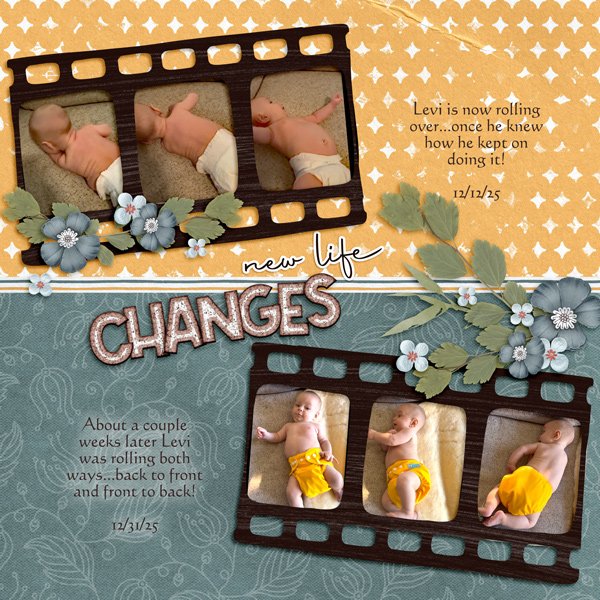
Glori2 chose to document growth in a little person learning new skills. That narrow strip of striped paper divides the layout neatly across the middle, with paired film strips providing the proof. There’s not a shred of pink to be seen. šŸ˜‰

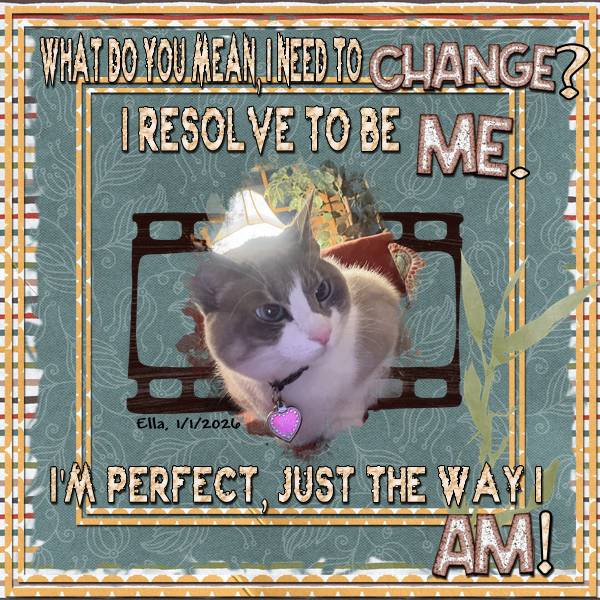
Are you laughing our loud right now? I LOVE the humour in makeyesup‘s layout. It’s true – dogs have masters, cats have staff. šŸ™‚ I like the narrow yellow paper borders overlying the striped paper in the background and the blue-gray paper in the foreground.

For her layout, kabrak1207 has used almost everything from the mini and added some bits from the Between Then & Next. It’s interesting that the way she’s arranged the papers in her stack makes that blue-gray paper look more green. The spray of elements along the edge of her photo adds the perfect touch to bring all the attention to the little girl’s eyes.

I hope I haven’t made any glaring typos! I never realized how much I use my left ring finger before. The splint is doing the job and I might be able to leave it off in a day or so. And I really should analyze how I injured it so I can prevent a recurrence. Anyway, how would you all like me to learn the difference between the Lasso Tool and the Magic Wand Tool and share it with you?

Designer Spotlight (January 2026)

Neia Scraps

Welcome to the first Designer Spotlight of 2026! Up first this year is the Über-productive and highly-sought-after Edneia aka Neia Scraps. Now, Neia and I have had a number of chats, and this time we’ve come up with some great new schtick… she has a great sense of humour and we get along like a house on fire. Wanna know what I’ve learned about her lately? Read on!

J: I’m so happy you’re here again! We must be doing something right, you keep coming back for more. I told you last time we talked how much I love the small changes you’ve made to the spirit of your designs. Bet you didn’t know I bought about a dozen of your collections not long after that chat. šŸ˜‰ Before we really get into it, let’s remind everybody how you got into digital design in the first place.

N: It started very naturally. I was drawn to the creative freedom — being able to tell stories visually without strict rules. Over time, it became my main creative language.

J: Ah, creative freedom! That’s something we all enjoy. What’s the main source of your inspiration when designing a new collection?

N: Usually a feeling first, not an object. I like starting with a mood and letting the elements grow from there.

J: That explains the subtle shift in your work. It’s definitely more sensitive and passionate. How would you describe your work?

N: Artistic, emotional, and organic.

J: Totally! I’ve noticed that your collections have expanded and become very inclusive. Do you prefer designing papers or elements?

N: Elements. They feel more organic to me — like little characters that can live in many different stories.

J: That’s a great way to describe them. I love elements that are truly versatile. Because, well… my credit lists are the stuff of legend. šŸ˜€ I often take one element from each of a dozen kits and bring them all together into one layout. It’s fun! What do you enjoy most about seeing others use your designs?

N: Seeing how personal their pages become. The designs are mine, but the stories are theirs — and that’s the best part.

J: It must be so satisfying! Now, since colour is a huge part of designing, if you could BE a colour, which one would you choose?

N: A soft neutral. Calm on the surface, but very flexible and expressive when combined with other colors.

J: I love it! Colour Ninja! So how do you unwind after a long design-superhero day?
N: A quiet moment with coffee or tea. I like letting my mind wander — that’s usually when new ideas show up.

J: I like a nice snuggle with one of my dogs. (Lately, not the one that keeps peeing on the hallway runner. She’s on the bad-dog list. :D) If you could have any animal, real or imaginary, as a pet, what would you have?

N: A dragon. I’d love to fly on its back. And if that sounds a little Fourth Wing–inspired… that’s definitely not a coincidence.

J: Nothing wrong with a little flight-of-fancy! Would you teleport if you could?

N: I’d go somewhere cold and calm. Snow, trees, a cozy place… the kind of place where ideas slow down and settle.

J: Canada fits that bill! Right now, where I live, we don’t actually have any snow – which is NOT usual, but it’s making a lot of people happy. What one thing always makes you smile?

N: When someone uses my designs in a way I never imagined. That’s always a nice surprise.

J: Aha! You’ve thrown down a gauntlet there. Hear that everybody? Your mission, should you choose to accept it, is to find a completely unique and unexpected way to use Neia Scraps designs for a layout. Even better? She’s hosting TWO Challenges this month!! Of course, she’d hosting the Designer Spotlight Challenge, as well as her usual My Memories Challenge. (They’re linked up for you, just click on them.) And if that’s not enough for you… This month, everything in her store is 45% off—or even more on bundles! And here’s a little bonus: spend $20 or more and get an extra 10% off at checkout. Use the coupon: NEIA-SL202610

Aaaaaand… the Daily Download, here on the Blog is yours, free, for the taking.

Well, what are you waiting for? GO!