Out With the Old and In With the New @ Gingerscraps!

Can you believe we’re already halfway through January? Where is the time going? Well, before too much more time gets away from you, make sure you check out the “Out With the Old” retirement sale here at Gingerscraps! Retiring products are 65% off! Now through January 25th!

001
https://store.gingerscraps.net/Out-With-The-Old-2018-Retiring-Products-65-OFF

*IMPORTANT NOTES* This sale will end promptly at 11:59pm (Eastern Time) on the January 25th. Please download your purchase! These products will be deleted from our shop and servers approximately 45 days after the close of this sale. Once they are gone, they will be gone for good.

Remember when you spend $10 in the store, you get a great new collab!

fwp_thumb3_thumb_thumb
https://store.gingerscraps.net/GingerBread-Ladies-Collab-Stick-To-It.html

Before I start with the beautiful kits and products that the designers have created for you, I just have to share this awesome news with you, a new Welcome Wagon kit has been released! If you do not know about our Welcome Wagon area, you should go check it out right away! Once you register in the forum, you will have access to the Welcome Wagon area. The designers create wonderful goodies and give them to you for FREE! The Welcome Wagon has been up and running, for over a year, so our designers are changing their goodies! New goodies, Free goodies!

Today, you’re being given a new lovely gift by Heather Z Scraps!

001a
https://forums.gingerscraps.net/forumdisplay.php?499-The-GingerScraps-Welcome-Wagon

002
https://store.gingerscraps.net/CU-Hockey-Gear-Layered-Templates.html

003
https://store.gingerscraps.net/CU-Hockey-Words.html

004
https://store.gingerscraps.net/Midnight-QuickPages.html

005
https://store.gingerscraps.net/Sports-Running-GrabBag.html

006
Bundle: https://store.gingerscraps.net/Explore-The-Stars-Bundle.html
Page Kit: https://store.gingerscraps.net/Explore-The-Stars-PageKit.html
Flairs: https://store.gingerscraps.net/Explore-The-Stars-Flairs.html
Grunge: https://store.gingerscraps.net/Explore-The-Stars-Grunge.html
Ombre Papers: https://store.gingerscraps.net/Explore-The-Stars-OmbrePapers.html
Titles: https://store.gingerscraps.net/Explore-The-Stars-Titles.html
Journal Cards: https://store.gingerscraps.net/Explore-The-Stars-JournalCards.html

007
https://store.gingerscraps.net/Shades-of-Blue-Collection-by-Lindsay-Jane.html

008
https://store.gingerscraps.net/Shades-of-Blue-by-Lindsay-Jane.html

009
https://store.gingerscraps.net/How-Great-Your-Love-Is-by-Luv-Ewe-Designs.html

010
Bundle: https://store.gingerscraps.net/Winter-Frost-collection.html
Page kit: https://store.gingerscraps.net/Winter-Frost-kit.html
Journaling Cards: https://store.gingerscraps.net/Winter-Frost-journaling-cards.html
Graffiti Pack: https://store.gingerscraps.net/Winter-Frost-graffiti-pack.html
Glitter Pack: https://store.gingerscraps.net/Winter-Frost-glitter-pack.html
Shabby Barnwood Papers: https://store.gingerscraps.net/Winter-Frost-shabbywoods.html

011
Bundle: https://store.gingerscraps.net/Winter-Weary-BUNDLE-by-MagsGraphics.html
Kit: https://store.gingerscraps.net/Winter-Weary-KIT-by-MagsGraphics.html
Alpha: https://store.gingerscraps.net/Winter-Weary-ALPHA-by-MagsGraphics.html
Grunge Elements: https://store.gingerscraps.net/Winter-Weary-GRUNGE-Elements-by-MagsGraphics.html
Word Art: https://store.gingerscraps.net/Winter-Weary-WORD-ART-by-MagsGraphics.html

012
https://store.gingerscraps.net/Miss-Fish-Templates-Jan-2018-Retiring-Template-Bundle.html

013
https://store.gingerscraps.net/In-Love-Template-Collab.html

014
Flea Market: https://store.gingerscraps.net/Flea-Market-Quick-Pages-by-Scraps-N-Pieces.html
Sweet Magnolia: https://store.gingerscraps.net/Sweet-Magnolia-Quick-Pages-by-Scraps-N-Pieces-SNP_SMqps.html
On The Bayou: https://store.gingerscraps.net/On-the-Bayou-Quick-Pages-by-Scraps-N-Pieces-SNP_OTBqps.html  
My Life November: https://store.gingerscraps.net/My-Life-November-Quick-Pages-by-Scraps-N-Pieces.html

015
https://store.gingerscraps.net/My-life-in-photobook-23..html

016
https://store.gingerscraps.net/In-Love-Grab-Bag.html

017
Collection: https://store.gingerscraps.net/Au-Natural-Collection-by-Aimee-Harrison.html
Kit: https://store.gingerscraps.net/Au-Natural-Page-Kit-by-Aimee-Harrison.html
Alphas: https://store.gingerscraps.net/Au-Natural-Alpha-Sets-by-Aimee-Harrison.html
Borders: https://store.gingerscraps.net/Au-Natural-Borders-by-Aimee-Harrison.html
Blooms: https://store.gingerscraps.net/Au-Natural-Blooms-by-Aimee-Harrison.html
Messy Edges: https://store.gingerscraps.net/Au-Natural-Messy-Edges-by-Aimee-Harrison.html
Stamps: https://store.gingerscraps.net/Au-Natural-Stamps-by-Aimee-Harrison.html
Glitters: https://store.gingerscraps.net/Au-Natural-Glitters-by-Aimee-Harrison.html

018
Kit https://store.gingerscraps.net/Winter-Magic-Kit.html
Cards https://store.gingerscraps.net/Winter-Magic-Cards.html
Painted Papers https://store.gingerscraps.net/Winter-Magic-Painted-Papers.html
Bundle https://store.gingerscraps.net/Winter-Magic-Bundle.html

019
https://store.gingerscraps.net/In-Love-Template-Collab-5-Grab-Bag.html

020
https://store.gingerscraps.net/Frosty-Fun-BGD.html

021
Grab Bag: https://store.gingerscraps.net/January-2018-Grab-Bag-Farmhouse-by-Connie-Prince.html
Quick Pages: https://store.gingerscraps.net/Farmhouse-QuickPages-by-Connie-Prince.html
Alpha Pack AddOn: https://store.gingerscraps.net/Farmhouse-Alpha-Pack-AddOn-by-Connie-Prince.html
Word Art: https://store.gingerscraps.net/Farmhouse-WordArt-Pack-by-Connie-Prince.html

022
https://store.gingerscraps.net/Craft-Templates-Seasons-Winter3.html

023
https://store.gingerscraps.net/Adventures-Of-Winter-Digital-Scrapbook-Kit-By-Dandelion-Dust-Designs.html

024
https://store.gingerscraps.net/Dear-Friends-Designs/

025
Bundle: https://store.gingerscraps.net/Celebrate-2018-January-BUNDLE-by-Heather-Z-Scraps.html
Kit: https://store.gingerscraps.net/Celebrate-2018-January-KIT-by-Heather-Z-Scraps.html
Accents: https://store.gingerscraps.net/Celebrate-2018-January-ACCENTS-by-Heather-Z-Scraps.html
Journal Cards: https://store.gingerscraps.net/Celebrate-2018-January-JOURNAL-CARDS-by-Heather-Z-Scraps.html
Word Bits & Dates: https://store.gingerscraps.net/Celebrate-2018-January-WORD-BITS-and-DATES-by-Heather-Z-Scraps.html
Extra Papers: https://store.gingerscraps.net/Celebrate-2018-January-EXTRA-PAPERS-by-Heather-Z-Scraps.html

026
https://store.gingerscraps.net/Life-Pages-1-Templates-by-JB-Studio.html

028
https://bit.ly/2EQYjOo

029
https://store.gingerscraps.net/JoCee-Designs/

030
https://store.gingerscraps.net/Out-With-The-Old-2018-Retiring-Products-65-OFF

Remember, if you complete 10 challenges, just ten, you get a free kit as well!!

cr_thumb3_thumb_thumb
Get ready to get yourself a pen pal for this kit!

Sneak Peeks January 18th, 2018

Happy Thursday!!! I am freezing in Florida. In Northern FL, it was so cold icicles formed on fountains! I am officially done with this winter! I like it cool but when frost starts showing up on my yard more than once in a month, I am done. After all, I moved to FL to get away from the white stuff. I hope everyone else is staying warm and cozy! This weekend looks like it will be a good weekend to stay in and scrap! Maybe one of the new releases from our fantastic designers will spark your creativity! Let’s check out a peek of what is releasing tomorrow!

From Mags Graphics

From Heather Z

From Craft-tastrophic

From Tinci


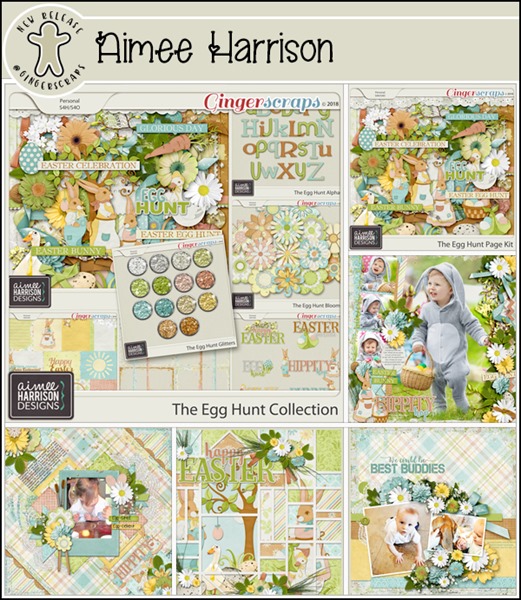
From Aimee Harrison

From Lindsay Jane

Have a wonderful weekend!

Tutorial Tuesday (Photoshop Elements)

The ART of ILLUSION

Last week I promised you a technique to really rock the January Inspiration challenge, and I hope you agree that this is it! Ivonne, the brilliance behind Craft-tastrophic, gave us this photo as the platform around which to build our layouts.

I tend to be pretty literal in my adaptation of this kind of challenge, so my goal was to find some photos of balloons, a girl in a pink dress and the Paris skyline. There were also some requirements in addition – the girl had to have an outstretched hand to attach the balloons to, the photos had to be lit roughly equally and the light source had to come from the same direction. Now, those last two can be fudged sometimes, the former by tweaking the exposure and the latter simply by flipping the photo horizontally, but lucky for me the photos I found at Pixabay ticked all my boxes without any major fuss.

Early in my tutorial authoring “career” I showed y’all two different ways to extract an image from its background. I used both of them for the final result. The first I used on two photos of hot air balloons (you can see them below in the Layers panel); it’s the Magic Wand method, quick and easy, and especially suited for images with few finicky details. The second, using a Layer Mask and the Eraser tool, was used for the photo of my girl in her pink dress. The screenshot below is a refresher on adding and using a Layer Mask. Remember, black reveals, white conceals. If you make a boo-boo, click on the X key to toggle between hiding and uncovering to undo whatever needs fixing.

Zoom in as much as necessary to keep your edges clean and to avoid removing something you’ll miss later.

I like to work my way around the edge of my image all the way, making a good-sized gap between the superfluous background and my detail so that later I can increase the size of my eraser to enormous and quickly remove the rest of the background.

Here are the three images I’ve extracted to add onto the Paris skyline.

I plopped my extracted images onto my Paris skyline photo and moved them around, adjusted their sizes as needed and positioned them where they’d make the most sense. Once I had the balloons positioned so the shadows in the original images were in the right direction and the perspective looked good, then I had to make the balloons look like the girl is holding them. So I made some “strings” on a new layer.

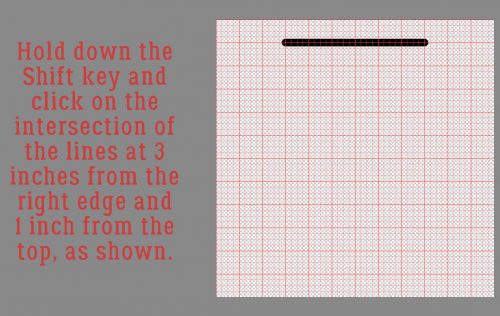
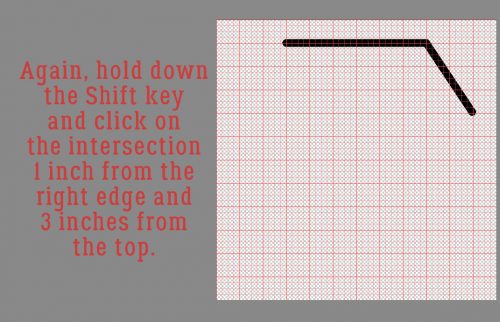
With the Pen tool I drew two perfectly straight lines from the baskets of the hot air balloons to the girl’s hand. To draw a straight line, all you have to do is decide your starting point then click there. Holding down the Shift key move your cursor to the end point and click again. That’s it, that’s all! I used a 5 pixel pen tip and a light gray colour for the strings. Then I made some little tails inside her palm just for an added touch of the possible.

To turn those straight lines into something resembling string, I used the Texturizer FilterFilter>Texture>Texturizer

The defaults in this tool are Brick, Burlap, Canvas and Sandstone. The one most likely to look like string is Canvas, so that’s what I used. Adjustments you can make inside the Texturizer menu are Scaling – how big your texture will look, Relief – how “high” it will lift off the image, and the Light source. You also get a preview without the background there so you can actually gauge what’s happening in real time. You’re going for a realistic look here.

I moved on to look at the girl. I wanted her to look like she really was standing on the roof. And she didn’t…

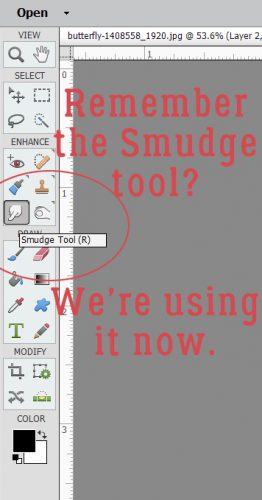
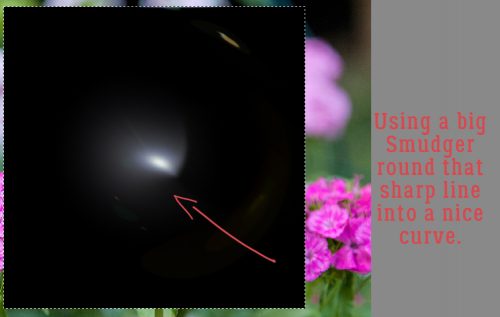
I created a custom shadow on its own layer, which we’ve covered a number of other times in other tutorials. She won’t cast a shadow anywhere but where she touches the roof, so I used the Smudge tool to achieve that.

There, now she looks like she’d touching the stone. But it still isn’t quite right. Her skirt should also cast a bit of a shadow, so I Smudged my shadow layer there too. All that was left was to adjust the Opacity and Blend Mode and I was thrilled with how it looked.

My finished layout was created with Heartstrings Scrap Art‘s The Bigger Picture 3 Winter’s Frost template B and her Time Traveler kit.

You know you’re only limited by the boundaries of your imagination!

$1.00 Bake Sale! January 15-20

Who’s ready for some AMAZING $1.00 deals? We have full kits, templates, frame packs and more! Our $1.00 Bake Sale will run from January 15-20th, you won’t want to miss these deals!

*$1.00 Bake Sale* January 15-20

Fresh Baked: January 12, 2018

Another week down. Kids are back in school, and schedules are returning more to normal. All the slowdown means is that there’s more time to scrap the memories. And this week, the designers have some amazing kits and templates to help you create the perfect layout!

Remember when you spend $10 in the store, you get a great new collab!

fwp_thumb3_thumb
https://store.gingerscraps.net/GingerBread-Ladies-Collab-Stick-To-It.html

just01
Collection: https://store.gingerscraps.net/Hot-Cocoa-Bundled-Collection-by-JB-Studio.html
Stickers: https://store.gingerscraps.net/Hot-Cocoa-Stickers-by-JB-Studio.html
Masks: https://store.gingerscraps.net/Hot-Cocoa-Masks-and-Overlay-by-JB-Studio.html

krist01
https://store.gingerscraps.net/CU-Heart-Box-Layered-Templates.html

krist02
https://store.gingerscraps.net/CU-Hexagonal-Box-Layered-Template.html

lauries01
https://store.gingerscraps.net/Explore-The-Stars-GrabBag.html

lauries02
Bundle: https://store.gingerscraps.net/Say-Ahhh-Bundle.html
Kit: https://store.gingerscraps.net/Say-Ahhh-PageKit.html
Flairs: https://store.gingerscraps.net/Say-Ahhh-Flairs.html
Grunge: https://store.gingerscraps.net/Say-Ahhh-Grunge.html
Ombre Papers: https://store.gingerscraps.net/Say-Ahhh-OmbrePapers.html
Titles: https://store.gingerscraps.net/Say-Ahhh-Titles.html
Journal Cards: https://store.gingerscraps.net/Say-Ahhh-JournalCards.html

lindsay01
https://store.gingerscraps.net/Stacked-Pieces-17-Templates-by-Lindsay-Jane.html

lindsay02
https://store.gingerscraps.net/Stacked-Pieces-18-Templates-by-Lindsay-Jane.html

luv
https://store.gingerscraps.net/Be-A-Unicorn-by-Luv-Ewe-Designs.html

mags01
https://store.gingerscraps.net/Best-Gift-of-All-Mini-KIT-by-MagsGraphics.html

missfish01
https://store.gingerscraps.net/The-Odds-and-Evens-Template-Bundle-by-Miss-Fish.html

neia
https://store.gingerscraps.net/Neia-Scraps/

ponytails
https://store.gingerscraps.net/Silver-and-Gold.html

scraps01
https://store.gingerscraps.net/The-Sound-of-Music-by-Scraps-N-Pieces.html

tinci
Clustered: https://store.gingerscraps.net/Precious-album-5.-Clustered.html
Basic: https://store.gingerscraps.net/Precious-album-5.-Basic.html

whimpy
https://store.gingerscraps.net/Wimpychompers/

aimee01
https://store.gingerscraps.net/Word-Up-2-Templates-by-Aimee-Harrison.html

aimee02
https://store.gingerscraps.net/Shape-It-1-Templates-by-Aimee-Harrison.html

aimee03
Mega Collection: https://store.gingerscraps.net/Ode-to-Joy-Mega-Collection-by-Aimee-Harrison.html
Kit: https://store.gingerscraps.net/Ode-to-Joy-Page-Kit-by-Aimee-Harrison.html
Alphas: https://store.gingerscraps.net/Ode-to-Joy-Alpha-Sets-by-Aimee-Harrison.html
Add-On: https://store.gingerscraps.net/Ode-to-Joy-Christmas-Eve-Elements-Add-on-by-Aimee-Harrison.html
Borders: https://store.gingerscraps.net/Ode-to-Joy-Borders-by-Aimee-Harrison.html
Journal Cards: https://store.gingerscraps.net/Ode-to-Joy-Journal-Cards-by-Aimee-Harrison.html
Gift Tags: https://store.gingerscraps.net/Ode-to-Joy-Gift-Tags-by-Aimee-Harrison.html
Greeting Cards: https://store.gingerscraps.net/Ode-to-Joy-Greeting-Cards-by-Aimee-Harrison.html
Ombre Papers: https://store.gingerscraps.net/Ode-to-Joy-Ombre-Papers-by-Aimee-Harrison.html
Stamps: https://store.gingerscraps.net/Ode-to-Joy-Stamps-by-Aimee-Harrison.html
Messy Edges: https://store.gingerscraps.net/Ode-to-Joy-Messy-Edges-by-Aimee-Harrison.html
Glitters: https://store.gingerscraps.net/Ode-to-Joy-Shimmers-by-Aimee-Harrison.html

blue
https://store.gingerscraps.net/Hello-2018.html

boomers
https://store.gingerscraps.net/Better-Together-BGD.html

cathyk
https://store.gingerscraps.net/Formal-Night-Mini-Kit.html

connie01
Word Art and Flair Pack: https://store.gingerscraps.net/Travelogue-Montana-Word-Art-and-Flair-Pack-by-Connie-Prince.html
Bundle Pack: https://store.gingerscraps.net/Travelogue-Montana-Bundle-Pack-by-Connie-Prince.html
Kit: https://store.gingerscraps.net/Travelogue-Montana-Kit-by-Connie-Prince.html
Word Bits: https://store.gingerscraps.net/Travelogue-Montana-Word-Bits-by-Connie-Prince.html
Templates: https://store.gingerscraps.net/Travelogue-Montana-12×12-Temps-CU-Ok-by-Connie-Prince.html

connie02
https://store.gingerscraps.net/January-2018-Template-Bundle-by-Connie-Prince.html

craft
https://store.gingerscraps.net/Craft-Templates-Seasons-Winter2.html

dandelion
https://store.gingerscraps.net/Winter-Wonderland-Digital-Scrapbook-By-Dandelion-Dust-Designs.html

daydreams
Bundle: https://store.gingerscraps.net/New-Beginnings-Bundled-Collection-by-Day-Dreams-n-Designs.html
Kit: https://store.gingerscraps.net/New-Beginnings-Kit-by-Day-Dreams-n-Designs.html
Glitter Papers: https://store.gingerscraps.net/New-Beginnings-Glitter-Papers-by-Day-Dreams-n-Designs.html
Extra Papers: https://store.gingerscraps.net/New-Beginnings-Extra-Papers-by-Day-Dreams-n-Designs.html

heather
https://store.gingerscraps.net/Woodland-Winter-KIT-by-Heather-Z-Scraps.html

jocee
https://store.gingerscraps.net/selfie-time-kit.html

ad03_thumb
https://store.gingerscraps.net/Miss-Fish-Templates/

ad06_thumb
https://store.gingerscraps.net/Heather-Z-Scraps/

ad01
https://eepurl.com/o9Aa1

Remember, if you complete 10 challenges, just ten, you get a free kit as well!!

cr_thumb3_thumb
Get ready to get yourself a pen pal for this kit!

Sneak Peeks January 11th, 2018

Happy Thursday!! How is 2018 treating everyone? Our Designers have a ton of great new releases debuting tomorrow! Lets take a look!

From Craft-tastrophic

From Ponytails

From Aimee Harrison

From Heather Z

From Neia Scraps

From JoCee Designs

From Tinci

From Luv Ewe

From CathyK

From JB Studio

From Miss Fish

Check back tomorrow to see all the awesomeness our designers have created!

Tutorial Tuesday (Photoshop Elements)

Like Snowflakes… No Two ALIKE

Hey GingerScrappers! Are you ready for another technique (or two)? This week’s tutorial shows two ways of using the Custom Shape tool and reviews customising shadows in Elements. The inspiration for it came from comments in the Gallery on two of my layouts, each with a paper snowflake. I used templates for both of them but that doesn’t mean I can’t show you how the effects were achieved. For the examples I used the January Buffet collection from Just So Scrappy called Bundle Up. I started with a 12×12 page on my workspace. For the first part of the tutorial the background paper is a darker blue one with white spots and the gray stripe for the snowflake.

After I moved the blue spotted paper onto the page, I chose the Custom Shape tool, the one that looks like an amoeba. I also chose a light colour to create my shape so my tired old eyes could see it.

There are a number of options in the tool menu. I selected the Nature folder from the drop-down default shapes, chose a hefty snowflake from the folder and set it to Defined Proportions. This makes sure that my shape is as tall as it is wide. Symmetry is important in a snowflake!

There are two ways to Simplify shape layers. Don’t forget this step. It’s what gives you the upper hand over the snowflake. You can do it right from the Shape tool menu or you can right-click on the layer and select Simplify Layer as shown.

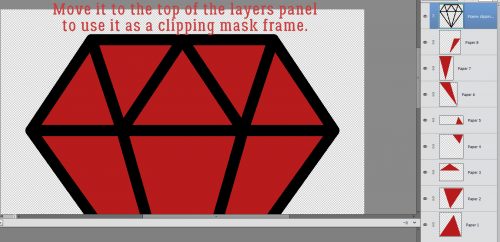
Then you’re going to clip a paper to the shape. The keyboard shortcut is CTRL/CMD>G for versions below 14 and CTRL/CMD>ALT>G in versions above 14.

Now let’s give our paper snowflake a custom shadow. You might recall a previous tutorial on this subject, so this will be a review. The full set of steps is described in the second technique. (After I made all my screenshots I decided I should reverse the order of the two techniques and didn’t want to go back and redo it all… Sorry!)

The steps are: New Layer below the cutout, Select the shape by CTRL/CMD>clicking on the shape layer thumbnail and filling the selected area with your shadow colour with the Paint Bucket tool. Then you want to move the shadow layer over and down in the direction your light source is coming from.

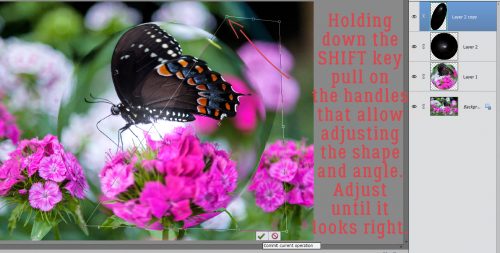
To really customise it and make your paper snowflake look 3-D, use the Smudge tool to gently move the shadows around. Think about how much light will get underneath the paper and nudge the shadow closer where the paper will lay flatter, farther away where it might lift.

If you’re working on a darker background and it’s too hard to see what you’re doing, turn the background layer(s) visibility off.

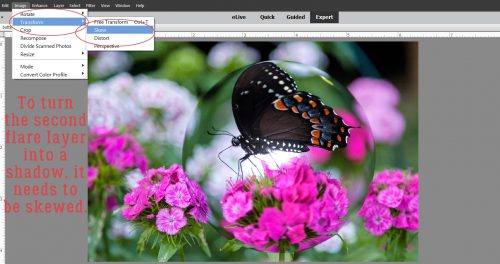
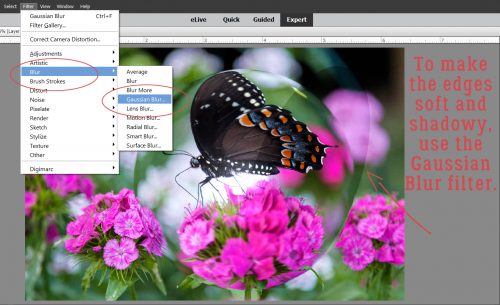
Aha! A typo!! That should say Gaussian BLUR! It’s found in the Filters menu. It softens the edges of your shadow to make it look more realistic. Change the Blend Mode to Linear Burn and decrease the Opacity until it looks like a nice shadowy bit.

There it is! A paper snowflake sitting pretty on your background paper.

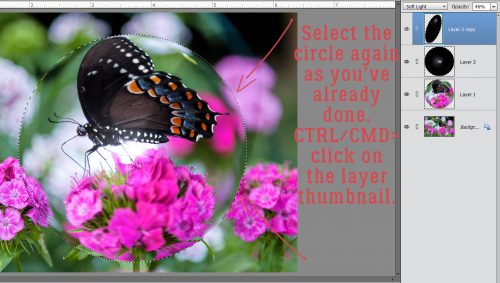
But let’s add some pizazz! For this step I used a wrinkled fabric brush I picked up free from Brusheezy. The brushes in this set have a maximum size of 2500×2500 pixels so I had to make my paper snowflake and its shadow small enough to completely cover it with the brush. To make sure the brush only covers the snowflake, I Selected the edges of it (CTRL/CMD>click on the layer thumbnail) then created a New Layer on TOP of the snowflake layer. I ALWAYS put my brushes on their own layer so I can play with them without affecting anything else.

I used the same colour as my shadow. It looks a bit too dark and opaque, but I’m going to change that.

As you can see in the screenshot below, you CAN use two different Blend Modes on one brush. I used Color Burn when I put the brush on the layer and then Multiply afterward. The effect is subtle but pleasing.

Then I pulled down the Opacity of the brush layer so the stripes show through again but the wrinkles are still there. The only flaw is that this technique does change the colour of the paper somewhat.

See? Now it’s so much more interesting to look at than a plain paper cutout!

Now let’s flip this around. Start with the gray striped paper.

Follow the shape-creation steps as before. I used the same snowflake shape.

As mentioned above, do use the Tool options. They make life so much easier. Play around with them to see how they change things.

Look familiar? Only for a few more minutes!

Simplify the shape layer.

Now drop the blue spotted paper on top of the gray striped paper and the shape layers.

Select your shape. Make sure you’re on the BLUE paper layer.

Cut the shape out of your paper. Instead of having a paper snowflake on top of your blue paper, you’ll have a snowflake-shaped hole in it.

And it’ll be the colour of your shape until you delete that layer or turn it off.

Here we are again. It looks a lot like the first one right now.

Select the blue paper layer by CTRL/CMD>clicking on the layer thumbnail, just like before.

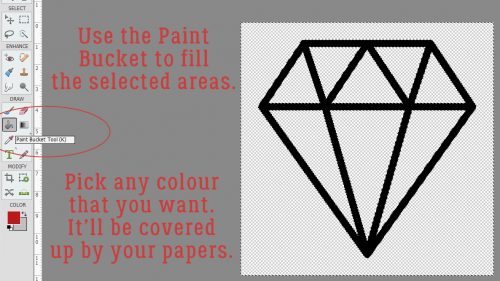
Create a new layer underneath the blue paper. Fill it with the Paint Bucket and your shadow colour.

Move it over and down in the direction your light is coming from.

There it is! In this iteration it’s easy to see so you can start Smudging it to make your 3-D effect.

“Lift” the paper where it might curl a bit, anchor it down where it should rest close to the background. Once you’ve done this shadow technique a few times, it becomes very quick and easy. Trust me! I almost never use shadow styles any more.

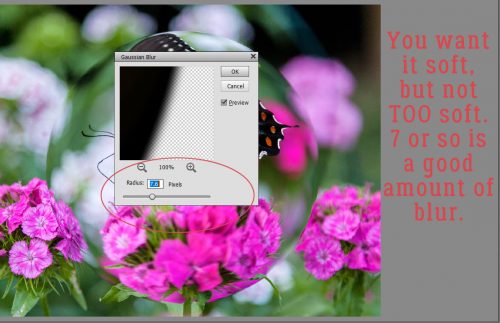
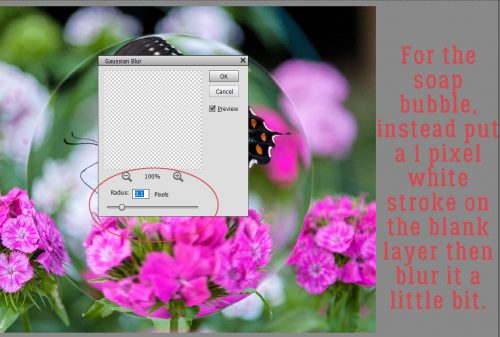
Here are your detailed instructions for the Gaussian Blur filter.

Clicking on the edge of the shadow somewhere gives you a preview in the adjustment box so you can see how much the edges soften. Don’t go crazy.

Pull down the Opacity

change the Blend Mode to Linear Burn and BOOM! You’re done!

Almost exactly the same steps, but such different looks!!

Next week I think I’m going to show you some photo manipulation tricks that you can use for the Inspiration Challenge. Stay tuned!

Let’s Celebrate – The New Year!

Happy 2018 scrappers! Here we are at the start of a new year. Let us hope that this year doesn’t blow past us like 2017 did. Did you celebrate the new year? Did you stay up until midnight and kiss 2017 goodbye? I didn’t. It was the 1st year I didn’t actually. I was just too tired to stay up. Didn’t even get any photos either. However, I know most of you all did! So today we are going to take a look in the store at all the new New Year goodies. There are a lot of them this year.


There you go. Just a glimpse into the selection of New Year products offered here at GingerScraps.  There are 20 pages of goodies! If none of these are what you are looking for, make sure to check out the New Years section in the store.  I pray that 2018 treats us all kind. That we have a wonderful year full of memories that are scrapped.

We would love to see your layouts with these or any other new year products offered here at GingerScraps. Make sure you upload your layouts in the gallery and then come back here and link us up! We would love to see your creations and leave you some love.

Fresh Baked: January 05, 2018

The first week of January just flew by. So much is happening. Crazy snowstorms. Even the warm areas are getting hit with cold. That’s just a great excuse to stay bundled up inside and get some of those memories from 2017 scrapped! And working on making new ones in 2018!

Remember when you spend $10 in the store, you get a great new collab!

fwp_thumb3
https://store.gingerscraps.net/GingerBread-Ladies-Collab-Stick-To-It.html

kristmess01
https://store.gingerscraps.net/Daze-Page-Kits-Bundle.html

kristmess02
https://store.gingerscraps.net/Daze-Trios-Big-Bundle.html

kristmess03
https://store.gingerscraps.net/CU-Month-Overlays.html

lauries01
https://store.gingerscraps.net/Say-Ahhh-GrabBag.html

lauries02
https://bit.ly/2CrZvH5

lindsay01
https://store.gingerscraps.net/New-Me-Collection-by-Lindsay-Jane.html

lindsay02
https://store.gingerscraps.net/New-Me-by-Lindsay-Jane.html

luvew01
https://store.gingerscraps.net/Document-Life-January-2018-Grab-Bag-by-Luv-Ewe-Designs.html

missfish01
https://store.gingerscraps.net/3-s-Company-Templates-by-Miss-Fish.html

missfish02
https://store.gingerscraps.net/Month-by-Month-January-Templates-by-Miss-Fish.html

aimee01
Collection: https://store.gingerscraps.net/Midwinter-Chill-Collection-by-Aimee-Harrison.html
Kits: https://store.gingerscraps.net/Midwinter-Chill-Page-Kit-by-Aimee-Harrison.html
Alphas: https://store.gingerscraps.net/Midwinter-Chill-Alpha-Sets-by-Aimee-Harrison.html
Borders: https://store.gingerscraps.net/Midwinter-Chill-Borders-by-Aimee-Harrison.html
Blooms: https://store.gingerscraps.net/Midwinter-Chill-Blooms-by-Aimee-Harrison.html
Messy Edges: https://store.gingerscraps.net/Midwinter-Chill-Messy-Edges-by-Aimee-Harrison.html
Stamps: https://store.gingerscraps.net/Midwinter-Chill-Stamps-by-Aimee-Harrison.html
Glitters: https://store.gingerscraps.net/Midwinter-Chill-Glitters-by-Aimee-Harrison.html

aimee02
Collection: https://store.gingerscraps.net/Silver-and-Gold-Collection-by-Aimee-Harrison.html
Kit: https://store.gingerscraps.net/Silver-and-Gold-Page-Kit-by-Aimee-Harrison.html
Alphas: https://store.gingerscraps.net/Silver-and-Gold-Alpha-Sets-by-Aimee-Harrison.html
Borders: https://store.gingerscraps.net/Silver-and-Gold-Borders-by-Aimee-Harrison.html

blue01
https://store.gingerscraps.net/Set-Your-Own-Path-6-Grab-Bag.html

blue02
https://store.gingerscraps.net/Week-By-Week-Journal-Card-Pack.html

boomers01
https://store.gingerscraps.net/Coffee-and-Cocoa-BGD.html

cathyk01
All Products in Collection: https://bit.ly/2zUXLE2
Bundle: https://store.gingerscraps.net/Winterberry-Frost-Bundle.html
Kit: https://store.gingerscraps.net/Winterberry-Frost-Kit.html
Papers: https://store.gingerscraps.net/Winterberry-Frost-Papers.html
Elements: https://store.gingerscraps.net/Winterberry-Frost-Elements.html
WordStrips: https://store.gingerscraps.net/Winterberry-Frost-Word-Strips.html
Masks: https://store.gingerscraps.net/Winterberry-Frost-Masks.html
Extra Papers: https://store.gingerscraps.net/Winterberry-Frost-Extra-Papers.html
Alphas: https://store.gingerscraps.net/Winterberry-Frost-Alphas.html

cathyk02
All Products in Collection: https://bit.ly/2zUXLE2
Kit: https://store.gingerscraps.net/Winterberry-Frost-Kit.html
Papers: https://store.gingerscraps.net/Winterberry-Frost-Papers.html
Elements: https://store.gingerscraps.net/Winterberry-Frost-Elements.html

craft01
https://store.gingerscraps.net/Craft-Templates-Seasons-Winter1.html

dandelion01
https://store.gingerscraps.net/TGIF-Digital-Scrapbook-Kit-By-Dandelion-Dust-Designs.html

daydreams01
Collection: https://store.gingerscraps.net/Snowman-Kisses-Bundled-Collection-by-Day-Dreams-n-Designs.html
Kit: https://store.gingerscraps.net/Snowman-Kisses-Kit-by-Day-Dreams-n-Designs.html
All packs: https://bit.ly/ddnd-GS

dearfriends01
https://store.gingerscraps.net/Wanderlust.html

heartstrings
https://store.gingerscraps.net/Ode-to-Joy-Templates.html

heatherz01
Bundle – https://store.gingerscraps.net/Away-in-a-Manger-BUNDLE-by-Heather-Z-Scraps.html
Kit – https://store.gingerscraps.net/Away-in-a-Manger-KIT-by-Heather-Z-Scraps.html
Word Bits – https://store.gingerscraps.net/Away-in-a-Manger-WORD-BITS-by-Heather-Z-Scraps.html
Embossed Papers – https://store.gingerscraps.net/Away-in-a-Manger-EMBOSSED-PAPERS-by-Heather-Z-Scraps.html

jbstudios01
https://store.gingerscraps.net/Catching-Snowflakes-Digital-Kit-by-JB-Studio.html

jocee01
Bundle: https://store.gingerscraps.net/Year-in-Review-Bundle.html
Kit: https://store.gingerscraps.net/Year-in-Review-Kit.html
Alphas: https://store.gingerscraps.net/Year-in-Review-Alphas.html
Flairs: https://store.gingerscraps.net/Year-in-Review-Flairs.html
Clusters: https://store.gingerscraps.net/Year-in-Review-Clusters.html
Word Grunge: https://store.gingerscraps.net/Year-in-Review-Word-Grunge.html
Word Tags: https://store.gingerscraps.net/Year-in-Review-Word-Tags.html
Titles: https://store.gingerscraps.net/Year-in-Review-Titles.html
Papers: https://store.gingerscraps.net/Year-In-Review-Papers.html

ad01
https://store.gingerscraps.net/Luv-Ewe-Designs/

ad02
https://store.gingerscraps.net/Magical-Scraps-Galore/

ad03
https://store.gingerscraps.net/Miss-Fish-Templates/

ad04
https://goo.gl/UBQg62

ad05
https://bit.ly/ddnd-GS

ad06
https://store.gingerscraps.net/Heather-Z-Scraps/

ad07
https://eepurl.com/o9Aa1

Remember, if you complete 10 challenges, just ten, you get a free kit as well!!

cr_thumb3
Get ready to get yourself a pen pal for this kit!

Sneak Peeks January 4th, 2018

Happy New Year!!!! It’s 2018 and our designers have some great new goodies for this first week of the year!

From Luv Ewe Designs


From Craft-tastrophic

From Lindsay Jane

From Miss Fish

From Aimee Harrison

From Heather Z

From JB Studio


Have a wonderful weekend!