Tutorial Tuesday (Photoshop Elements 2019)

FINALLY! Kerning is here!

Yes, I upgraded. I mentioned it last week, and that I’d only given it a cursory look-see. I accidentally created a layout using 2019, even though I’d intended to stick with the familiar for a while longer. There was one thing that caught my eye that I wanted to explore further, and this is the outcome.

One flaw I’ve always lamented (and did so in a couple of previous text-related tuts) is that Elements doesn’t allow kerning. What’s kerning? (I can see your quizzical looks!) Kerning is a printer’s term meaning the setting of two letters closer together than usual by decreasing the space between them. And with some fancy script fonts, kerning would be a really handy tool. Like Ballerina Script Regular… as I’m showing in my screenshot below. Those gaps!! Having to put each character on its own layer then nudging them together one at a time is such a time suck.
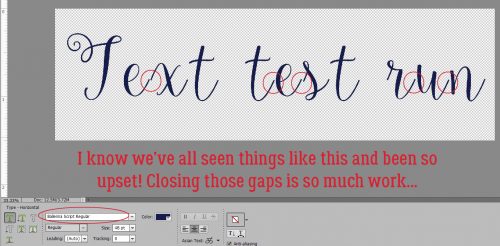
When I was journaling on the layout I accidentally used 2019 for, I noticed the addition of a new tool option in the Text tool called Tracking, and I suspected it had something to do with letter spacing. I was right!
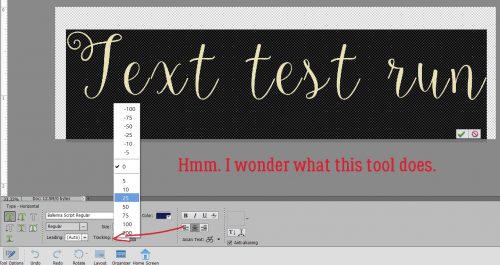
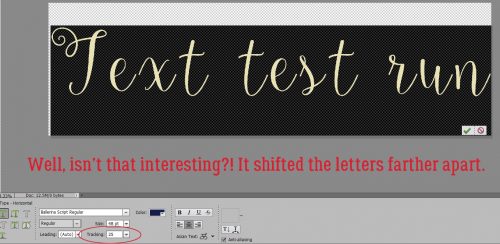
With my text selected (and that’s really important for WSNH), I clicked on 25, as shown, and the tool shifted all the letters farther apart.
Obviously, to bring the letters closer together the negative numbers are the ones to use. Just a single click on -25 and it’s almost where I want it!
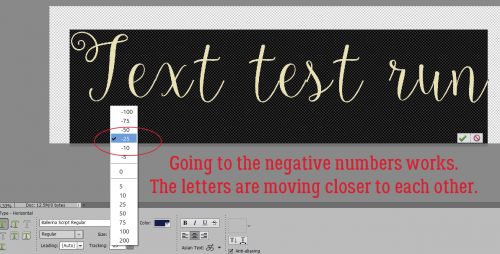
In an effort to make that “s” look better, I clicked on -50, but as you can see, the shift has now overshot and the “x” isn’t connected properly anymore. I know that other tools allow me to type in my desired number, so I tried that next.
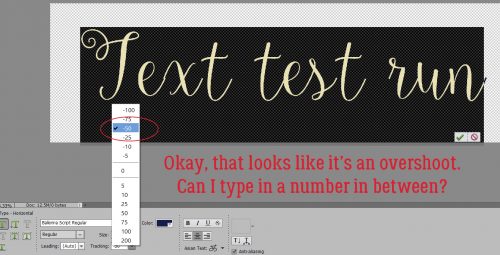
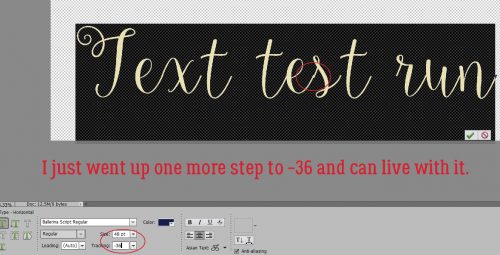
I tried -35. SO close!
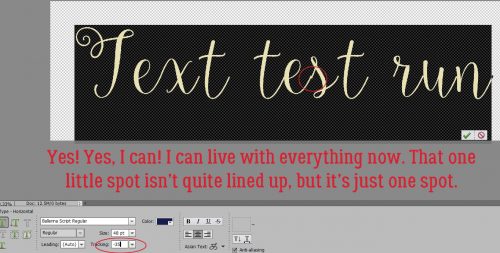
I changed it to -36 and decided I could live with it. What I DIDN’T think about was whether I could select just the “s” and move it by itself. That’s something I’ll try and I’ll let you know how it works out.
Here’s another script font that leaves huge gaps between letters. It’s called Peyton Script Regular. This might not be as quick to adjust.
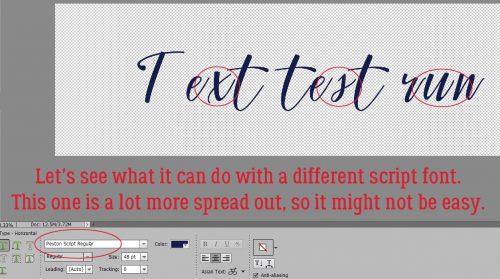
First I wanted to see what spreading it out more would look like. Because sometimes that might look okay.
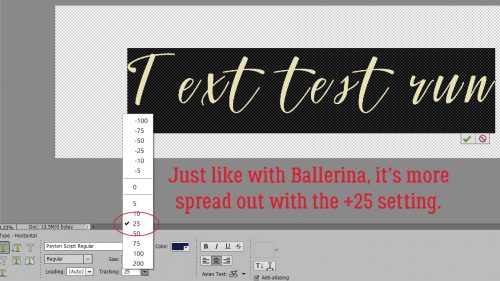
Then I went to the -25 setting and could see some improvement.

I figured it might be best to just jump right to -100. And it was better.
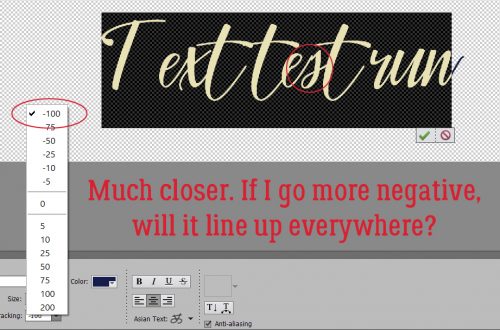
I only went up by 1 increment and ended up with sorta better. This is where isolating the “s” and adjusting only it might have been the answer. This font is fairly condensed to start with so I ended up with the crossbars on those two “t“s overlapping and looking wrong.
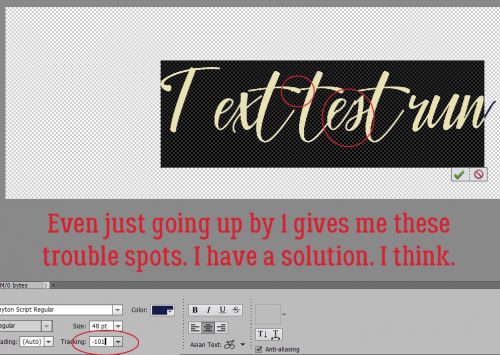
By adding a space with the spacebar between the words I was able to uncross the T bars, but was left with the “s“.
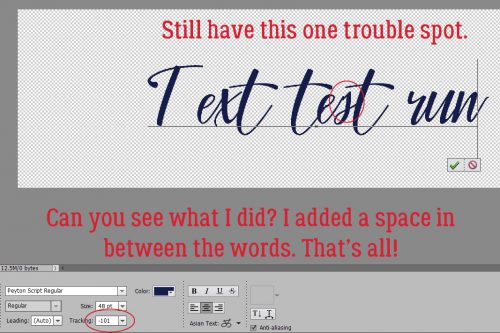
So now was the time to test my theory about isolating one or two characters only. Would it work?

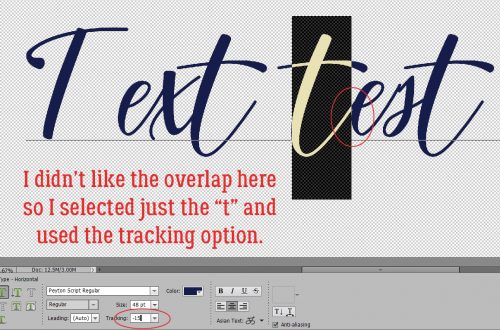
I started with this “t“, which looked a bit funny, the way the stroke overlapped the “e“. I ended up at -15.
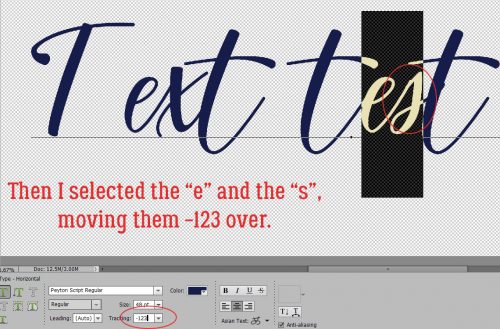
Then on to the “es“. It’s not perfect but it’s a lot better!
While I was at it, I decided I’d try to get rid of this little tail. Going to +25 was about the best I could do.
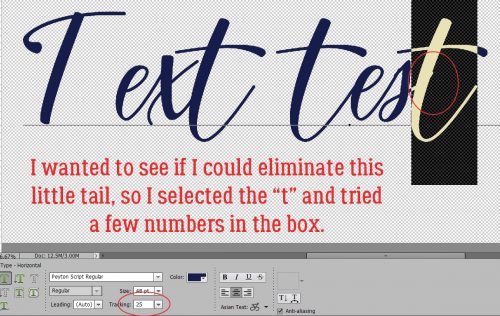
Then I Simplified the text and did some VERY minimal erasing. Looks pretty darned good now!
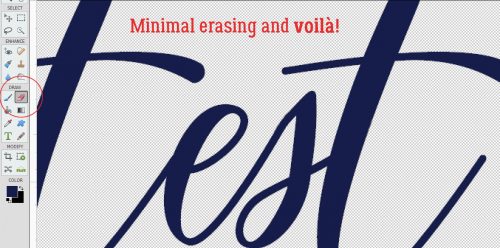
For me, this new tool option is a real game-changer. No longer do I have to choose between a font I love and the time it would take to make it look perfect. WINNER!!

New Buffet, New FWP, New Guest! New Month!

My life, I realize suddenly, is July. Childhood is June, and old age is August, but here it is, July, and my life, this year, is July inside of July.
– Rick Bass

It is the First of the month, and that means the reveal of our new Buffet!!

Don’t forget to check out the Buffet Bundles, one easy click to add bundles of Buffet goodies to your cart, and an amazing value too!

buffet

The designers all had their own take on what the colors and theme said to them! I love the variety!

The designers definitely each made the palette their own and came up with some gorgeous designs, each unique but working so well with the other designers’ creations

The CT did such a great job showing how well all of the kits blend. They all did wonderful work!

This is just a few of the layouts.

Remember when you spend $10 in the store, you get a great new collab! Nothing says summer like kids and their lemonade stands!

fwp
https://store.gingerscraps.net/GingerBread-Ladies-Collab-Lemonade-Stand.html

June’s Monthly Mix, In the Tropics, was created by CathyK, LouCee Creations, Miss Mis Designs, LDrag Designs, ADB Designs. Even if it’s not summer, everyone has a desire to escape to the tropics!

mm
https://store.gingerscraps.net/GingerBread-Ladies-Monthly-Mix-In-The-Tropics.html

Before we get to the new Daily Download, let’s look back at June’s full kit. It’s gorgeous and perfect for those Father’s Day pictures.

https://store.gingerscraps.net/Dapper-Chap-PageKit.html

Now, let’s jump right to the new Daily Download from Cathy K. I’m so excited for this one!! My family and I are going on a road trip in a

a
https://gingerscraps.net/gsblog/2019/07/dd-jul-1/

Remember, the download is kept up for 5 days, and then it is taken down. If you miss pieces, the kit will be available for purchase on the first day of the following month.

And our new guest for July is Charly of Charly Renay!

g01

And when we asked for a little bio from her, here is what she had to share:

Hi I’m Charly of Charly Renay Designs. I live in the beautiful state of Maine. I am a wife of the best man in this world for the last 28 yrs. We have 1 son together John Jr whom is 27 and we are proud grandparents of 2 little girls 1 and 5. We are blessed to have them live with us.
I started designing scrapbook products in 2008 and have enjoyed meeting so many new people who love the same passion as myself.
I am so excited to be Guest Designing at Ginger Scraps this month.

And here are just a few things that she has in her store!

g02
Collection: https://store.gingerscraps.net/April-Showers-Collection.html
Kit: https://store.gingerscraps.net/April-Showers-Scrapkit.html
Alpha: https://store.gingerscraps.net/April-Showers-Alpha-Set.html
Templates: https://store.gingerscraps.net/April-Showers-Templates.html
Word Art: https://store.gingerscraps.net/April-Showers-WA.html

g03
https://store.gingerscraps.net/Citrus-Breeze.html

g04
https://store.gingerscraps.net/Ribbit-Ribbit.html

And she has a great sale going on as well:

g05
https://store.gingerscraps.net/Charly-Renay

Remember, if you complete 10 challenges, just ten, you get a free kit as well!!

cr Hit the beach and catch a wave!!

Fresh Baked: June 28, 2019

It’s almost July, but don’t let that make you think the designers are slowing down and just waiting for the new month to release some amazing products! We’ve got templates. We’ve got masks. We’ve got some amazing kits!

And check out the sneak peeks for what’s coming in July!

Remember when you spend $10 in the store, you get a great new collab! There’s something about spring with that “old time” feel!

fwp_thumb_thumb_thumb_thumb
https://store.gingerscraps.net/GingerBread-Ladies-Collab-Farmhouse-Spring.html

1
https://store.gingerscraps.net/Conchita-Bundle-DOTW-Mexico-by-ADB-Designs.html

2
Collection: https://store.gingerscraps.net/360-Life-July-Enjoy-Collection-by-Aimee-Harrison.html
Kit: https://store.gingerscraps.net/360-Life-July-Enjoy-Page-Kit-by-Aimee-Harrison.html
Alphas: https://store.gingerscraps.net/360-Life-July-Enjoy-Alpha-Sets-by-Aimee-Harrison.html
Frames: https://store.gingerscraps.net/360-Life-July-Enjoy-Frame-Clusters-by-Aimee-Harrison.html
Blooms: https://store.gingerscraps.net/360-Life-July-Enjoy-Blooms-by-Aimee-Harrison.html
Extra Papers: https://store.gingerscraps.net/360-Life-July-Enjoy-Extra-Papers-by-Aimee-Harrison.html
Messy Edges: https://store.gingerscraps.net/360-Life-July-Enjoy-Messy-Edges-by-Aimee-Harrison.html
Glitters: https://store.gingerscraps.net/360-Life-July-Enjoy-Glitters-by-Aimee-Harrison.html

3
https://store.gingerscraps.net/Beach-Babe-BGD.html

4
Bundle: https://store.gingerscraps.net/-2019-July-Bundle-Collection-by-Connie-Prince.html
Kit: https://store.gingerscraps.net/-2019-July-Kit-by-Connie-Prince.html
Mixed Media: https://store.gingerscraps.net/-2019-July-Mixed-Media-by-Connie-Prince.html
Quoted: https://store.gingerscraps.net/-2019-July-Quoted-Pack-by-Connie-Prince.html
Messy Papers: https://store.gingerscraps.net/-2019-July-Messy-Papers-by-Connie-Prince.html
Border Clusters: https://store.gingerscraps.net/-2019-July-Border-Clusters-by-Connie-Prince.html
Week 27: https://store.gingerscraps.net/-2019-July-Week-27-Template-Pack-CU-Ok-by-Connie-Prince.html
Week 28: https://store.gingerscraps.net/-2019-July-Week-28-Template-Pack-CU-Ok-by-Connie-Prince.html
Week 29: https://store.gingerscraps.net/-2019-July-Week-29-Template-Pack-CU-Ok-by-Connie-Prince.html
Week 30: https://store.gingerscraps.net/-2019-July-Week-30-Template-Pack-CU-Ok-by-Connie-Prince.html
Week 31: https://store.gingerscraps.net/-2019-July-Week-31-Template-Pack-CU-Ok-by-Connie-Prince.html
Extra Papers: https://store.gingerscraps.net/-2019-July-Extra-Papers-by-Connie-Prince.html
Alpha Pack: https://store.gingerscraps.net/-2019-July-Alpha-Pack-AddOn-by-Connie-Prince.html
Word Art: https://store.gingerscraps.net/-2019-July-Word-Art-Pack-by-Connie-Prince.html
Pocket Cards: https://store.gingerscraps.net/-2019-July-Pocket-Cards-by-Connie-Prince.html
Quick Pages: https://store.gingerscraps.net/-2019-July-Quick-Pages-by-Connie-Prince.html

5
https://store.gingerscraps.net/Summer-In-Swing-Digital-Scrapbook-Kit-by-Dandelion-Dust-Designs.html

6
https://store.gingerscraps.net/Road-Maps-Vol.-14.html

7
https://store.gingerscraps.net/Road-Maps-Vol.-15.html

8
Kit: https://store.gingerscraps.net/Oily-Mama-Kit-by-KM-Ink-Digital-Designs.html
Cards: https://store.gingerscraps.net/Oily-Mama-Cards-by-KM-Ink-Digital-Designs.html
Bundle: https://store.gingerscraps.net/Oily-Mama-Bundle-by-KM-Ink-Digital-Designs.html

9
https://store.gingerscraps.net/CU-Layered-Paper-Templates-Marbled.html

10
[kit] https://store.gingerscraps.net/Stars-and-Stripes-by-LDragDesigns.html
[glitterstyles] https://store.gingerscraps.net/Stars-and-Stripes-Glitterstyles-by-LDragDesignsas.html
[cluster frames] https://store.gingerscraps.net/Stars-and-Stripes-Cluster-Frames-by-LDragDesigns.html
[journal cards] https://store.gingerscraps.net/Stars-and-Stripes-Journal-Cardsa-by-LDragDesigns.html

11
[the Collection] https://store.gingerscraps.net/Stars-and-Stripes-The-Collection-by-LDragDesigns.html
[Templates Vol. 1] https://store.gingerscraps.net/Stars-and-Stripes-Templates-Vol.-1-by-LDragDesigns.html
[Templates Vol. 2] https://store.gingerscraps.net/Stars-and-Stripes-Templates-Vol.-2-by-LDragDesigns.html

12
https://store.gingerscraps.net/Border-It-13-by-Lindsay-Jane.html

13
https://store.gingerscraps.net/Border-It-14-by-Lindsay-Jane.html

14
https://store.gingerscraps.net/Vacation-Album-Wanderlust-1-4-Templates-by-Miss-Fish.html

15
https://store.gingerscraps.net/Vacation-Album-Wanderlust-5-8-Templates-by-Miss-Fish.html

16
https://store.gingerscraps.net/Vacation-Album-Wanderlust-9-12-Templates-by-Miss-Fish.html

17
https://store.gingerscraps.net/Be-a-Dreamer-Templates-Vol2.html

18
Set1 – https://store.gingerscraps.net/Bright-emotions-Templates-Set1.html
Set2 – https://store.gingerscraps.net/Bright-emotions-Templates-Set2.html
Set3 – https://store.gingerscraps.net/Bright-emotions-Templates-Set3.html
Set4 – https://store.gingerscraps.net/Bright-emotions-Templates-Set4.html
Full Bundle – https://store.gingerscraps.net/Bright-emotions-Templates-Bundle.html

19
Splatters Photomasks Vol.1 – https://store.gingerscraps.net/Splatters-Photomasks-Vol1.html
Blending Photomasks Vol.1 – https://store.gingerscraps.net/Blending-Photomasks-Vol1.html
Watercolor Photomasks Vol.12 – https://store.gingerscraps.net/Watercolor-photomasks-Vol12.html
Watercolor Photomasks Vol.13 – https://store.gingerscraps.net/Watercolor-photomasks-Vol13.html

20
https://store.gingerscraps.net/Snickerdoodle-Designs-PU/

21
https://bit.ly/2YkBSLH

22
https://store.gingerscraps.net/JB-Studio/

23

24

26_thumb1
https://store.gingerscraps.net/Ilonkas-Designs/25_thumb1

Remember, if you complete 10 challenges, just ten, you get a free kit as well!!

cr_thumb_thumb_thumb_thumb
Make a list, and check it off! Summer is ON!

Sneak Peeks June 27th 2019

Happy Thursday! The heat is on this summer! It’s scorching out! I am glad digital scrapbooking can be done in the cool air conditioning. I hope you will be able to spend sometime in the cool indoors scrapping some of your great memories! Let’s check out some of the new releases coming out tomorrow!

From Clever Monkey Graphics


From Down This Road Designs


From Snickerdoodle designs

From JB Studio


From KM Ink Digital Designs

From Neia Scraps

From Alexis Design Studio

From Aimee Harrison

From Wimpchompers

Have a great weekend!

Tutorial Tuesday (Potpourri)

Summertime Funtime Fonts

So… I finally got around to updating the master link list for all the Tutorial Tuesday posts yesterday. This is TT post #139!! Amazing… that I’ve found that much to yammer on about! While I was going over the list, I realized that I haven’t done a post with summertime fonts and such. Here in the northern hemisphere, we’ve just past the summer solstice and welcomed the formal season. We’re under a huge bank of rain clouds and parts of Alberta and BC got snow on the 21st, so we’re not feeling summer love right now, but I’ve got a baker’s dozen today, a mixture of fonts and ding bats, all found free at dafont.com.

First up is this font, ironically named Summertime. It’s pretty and would be an amazing title font for garden photos, weddings and other celebrations.

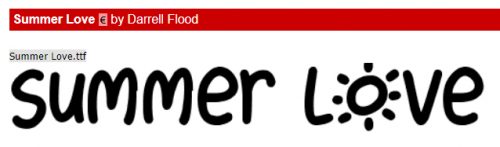
Next up is a fun font with some alternate characters from some of the letters, like that cure sun for the “O”.

If you live in the parts of the world where temperatures soar in the summer, (or you have annual forest fires 🙁 )this font might catch your eye.

This one made me almost spew my coffee. It looks just like I did at work last Tuesday! But I think it could be super for titles.

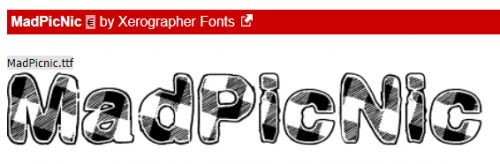
Think about doing this one in a dark red, and you’ve got a great picnic layout title. Or a cookout, if you go for gingham tablecloths.

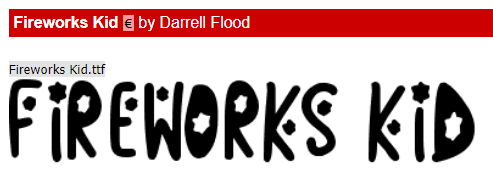
This one I threw in because two big celebrations are coming up fast. Canada Day and Independence Day. So fireworks are a natural.

This one and the next are different takes on a similar theme. I can’t decide which one I like better.

Can you?

Now for some ding bats. Ding bats are little mini line drawings that can be used in the same way as a font, but with very interesting and fun results.

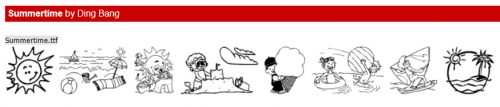
These are all very summery and could be used in so many ways.

This set could be used for more adult layouts. They’re solid, but by duplicating the layers, it would be easy to change colours and add glitter.

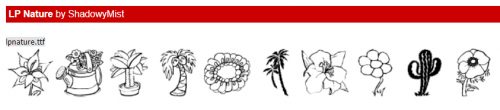
Same for these ones. I’m an avid gardener and have scads of garden photos. I’ll have to think about how I can use these.

This set has a mixture of images. The cactus could be incorporated into a desert layout title with that Summer Fire font. Amiright?

This set looks like so much fun! A day at the beach…

I have one last piece of news to add to this week’s post. Tomorrow is my last day of work in my real job. After 24 years of pediatric critical care nursing, I’m retiring. So I’ll have more time for hobbies… <does the happy dance> which is great timing, because I jumped on the Adobe sale for Elements 2019. Time to learn a few new tricks! (More to come on my retirement plans when I have them firmed up.) Have a great week, see you right here again next Tuesday!

It’s SUMMER! Time for a SALE!!

Summer Lovin’ Happened So Fast!

It’s officially summer! The days are long, the nights are short. The time to make memories is fully upon us!

And to honor summer the right way, Gingerscraps is having an amazing sale!

1
https://store.gingerscraps.net/Summer-Dreamin-65-OFF-FLASH-SALE

Remember when you spend $10 in the store, you get a great new collab! There’s something about spring with that “old time” feel!

fwp_thumb_thumb_thumb
https://store.gingerscraps.net/GingerBread-Ladies-Collab-Farmhouse-Spring.html

2
https://store.gingerscraps.net/Summer-feelings-1..html

3
https://store.gingerscraps.net/akiko-bundle-dotw-japan-by-adb-designs.html

4
Collection: https://store.gingerscraps.net/Chic-Life-Collection-by-Aimee-Harrison.html
Kit: https://store.gingerscraps.net/Chic-Life-Page-Kit-by-Aimee-Harrison.html
Alphas: https://store.gingerscraps.net/Chic-Life-Alpha-Sets-by-Aimee-Harrison.html
Borders: https://store.gingerscraps.net/Chic-Life-Borders-by-Aimee-Harrison.html
Wood Papers: https://store.gingerscraps.net/Chic-Life-Wood-Papers-by-Aimee-Harrison.html
Solid Papers: https://store.gingerscraps.net/Chic-Life-Solid-Papers-by-Aimee-Harrison.html
Messy Edges: https://store.gingerscraps.net/Chic-Life-Messy-Edges-by-Aimee-Harrison.html
Glitters: https://store.gingerscraps.net/Chic-Life-Glitters-by-Aimee-Harrison.html

5
Collection: https://store.gingerscraps.net/Fields-of-Lavender-Collection-by-Aimee-Harrison.html
Kit: https://store.gingerscraps.net/Fields-of-Lavender-Page-Kit-by-Aimee-Harrison.html
Alphas: https://store.gingerscraps.net/Fields-of-Lavender-Alpha-Sets-by-Aimee-Harrison.html
Borders: https://store.gingerscraps.net/Fields-of-Lavender-Borders-by-Aimee-Harrison.html
Frames: https://store.gingerscraps.net/Fields-of-Lavender-Frame-Clusters-by-Aimee-Harrison.html
Solids: https://store.gingerscraps.net/Fields-of-Lavender-Solid-Papers-by-Aimee-Harrison.html
Messy Edges: https://store.gingerscraps.net/Fields-of-Lavender-Messy-Edges-by-Aimee-Harrison.html
Glitters: https://store.gingerscraps.net/Fields-of-Lavender-Glitters-by-Aimee-Harrison.html

6
https://store.gingerscraps.net/Lovin-From-the-Oven-by-BoomersGirl-Designs.html

7
https://store.gingerscraps.net/June-2019-Template-Bundle-by-Connie-Prince.html

8
https://store.gingerscraps.net/Road-Maps-Vol.-13.html

9
Photograph | Collection: https://store.gingerscraps.net/Photograph-Collection.html
Photograph | Kit: https://store.gingerscraps.net/Photograph-Kit.html
Photograph | Finishing Touches: https://store.gingerscraps.net/Photograph-Finishing-Touches.html

10
https://store.gingerscraps.net/Ilonkas-Designs/

11
Kit: https://store.gingerscraps.net/Galentine-s-Day-Kit-by-KM-Ink-Digital-Designs.html
Bundle: https://store.gingerscraps.net/Galentines-Day-Bundle-by-KM-Ink-Digital-Designs.html
Cards: https://store.gingerscraps.net/Galentine-s-Day-Cards-by-KM-Ink-Digital-Designs.html

12
https://store.gingerscraps.net/Layered-Page-Templates-June.html

13
https://store.gingerscraps.net/June-Special-Deal-by-JB-Studio.html

14
[kit] https://store.gingerscraps.net/Flamingo-Paradise-by-LDragDesigns.html
[borders] https://store.gingerscraps.net/Flamingo-Paradise-Borders-by-LDragDesigns.html
[wornout papers] https://store.gingerscraps.net/Flamingo-Paradise-Worn-Out-Papers-by-LDragDesigns.html
[alphas] https://store.gingerscraps.net/Flamingo-Paradise-Alphas-by-LDragDesigns.html

15
[journal cards] https://store.gingerscraps.net/Flamingo-Paradise-Journal-Cards-by-LDragDesigns.html
[graffiti] https://store.gingerscraps.net/Flamingo-Paradise-Graffiti-by-LDragDesigns.html
[Collection] https://store.gingerscraps.net/Flamingo-Paradise-The-Collection-by-LDragDesigns.html
[Embossed Papers] https://store.gingerscraps.net/Flamingo-Paradise-Embossed-Papers-by-LDragDesigns.html
[glitter] https://store.gingerscraps.net/Flamingo-Paradise-Glitterstyles-by-LDragDesigns.html

16
https://store.gingerscraps.net/On-the-Beach-Collection-by-Lindsay-Jane.html

17
Kit: https://store.gingerscraps.net/On-the-Beach-by-Lindsay-Jane.html
Quick Pages: https://store.gingerscraps.net/On-The-Beach-Quick-Pages-by-Lindsay-Jane.html

18
Bundle: https://store.gingerscraps.net/Mixed-Emotions-collection.htmlPage
Kit: https://store.gingerscraps.net/Mixed-Emotions.html
Journaling Cards: https://store.gingerscraps.net/Mixed-Emotions-cards.html
Graffiti Pack: https://store.gingerscraps.net/Mixed-Emotions-graffiti.html
Bonus Papers: https://store.gingerscraps.net/Mixed-Emotions-bonus-papers.html
Word Bits: https://store.gingerscraps.net/Mixed-Emotions-words.html

19
Full Bundle – https://store.gingerscraps.net/Summer-delicacy-Bundle.html
Kit – https://store.gingerscraps.net/Summer-delicacy-Kit.html
Clusters&Wordart – https://store.gingerscraps.net/Summer-delicacy-Clusters-And-WA.html
Stamps – https://store.gingerscraps.net/Summer-delicacy-Stamps.html
Photomasks – https://store.gingerscraps.net/Summer-delicacy-Photomasks.html
Painted papers – https://store.gingerscraps.net/Summer-delicacy-Painted-papers.html
Masks&Frames – https://store.gingerscraps.net/Summer-delicacy-Masks-and-Frames.html

20
Watermelon Crawl QPs – https://store.gingerscraps.net/Watermelon-Crawl-Quick-Pages-by-Scraps-N-Pieces.html
Miles Apart QPs – https://store.gingerscraps.net/Miles-Apart-Quick-Pages-by-Scraps-N-Pieces.html

21
Collection: https://store.gingerscraps.net/Good-Friends-Collection-by-Snickerdoodle-Designs.html
Kit: https://store.gingerscraps.net/Good-Friends-Kit-by-Snickerdoodle-Designs.html
Bonus Papers: https://store.gingerscraps.net/Good-Friends-Bonus-Papers-by-Snickerdoodle-Designs.html
Borders: https://store.gingerscraps.net/Good-Friends-Borders-by-Snickerdoodle-Designs.html
Clusters: https://store.gingerscraps.net/Good-Friends-Clusters-by-Snickerdoodle-Designs.html
Journal Cards: https://store.gingerscraps.net/Good-Friends-Journal-Cards-by-Snickerdoodle-Designs.html
Words: https://store.gingerscraps.net/Good-Friends-Words-by-Snickerdoodle-Designs.html

22
https://store.gingerscraps.net/Summer-Dreamin-From-JoCee-Designs

23
https://store.gingerscraps.net/LDragDesigns/

24
JB Studio: https://store.gingerscraps.net/JB-Studio/
JB Studio Templates: https://store.gingerscraps.net/JB-Studio-templates/

27
https://bit.ly/2WNOqJD

26
https://store.gingerscraps.net/Ilonkas-Designs/25

Remember, if you complete 10 challenges, just ten, you get a free kit as well!!

cr_thumb_thumb_thumb
Make a list, and check it off! Summer is ON!

Sneak Peeks June 20th 2019

Happy day before Summer! Summer arrives tomorrow and our designers have awesome releases lined up! Let’s check out some of the awesome goodies!

From Down This Road

From Tinci Designs

From Lindsay Jane

From Aimee Harrison

From JB Studio

From LDrag

From Snickerdoodle Designs

Have a great weekend!

Tutorial Tuesday (Photoshop Elements)

Complex Shadows – Jan’s Method

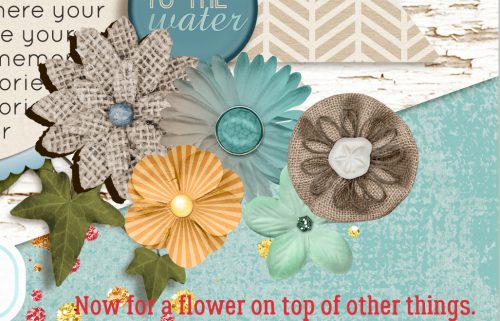
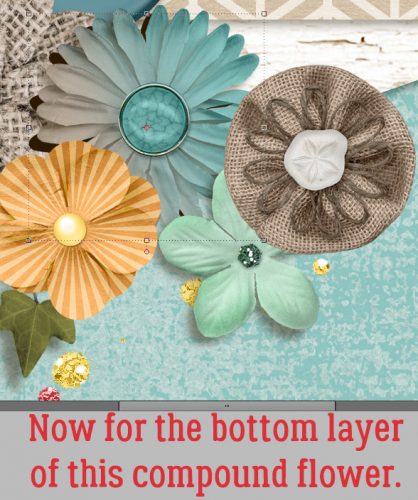
Shadows are what turns a 2-dimensional image into what looks 3-dimensional. They definitely make or break a layout. If you’ve played around with the recap tutorial from a couple of weeks ago, you’re probably ready to spread your wings and get into complex shadows. I’m not going to get into the actual 5 step-process, since that’s already been covered. Here I’ll show you how to use that Smudge tool to make your shadows even more realistic where your elements are sitting on top of other elements. For my layout, I used some of the template’s drop shadows, as you can see below. But for most of the layout I’ve customized my own shadows, starting with the ivy leaves shown here.

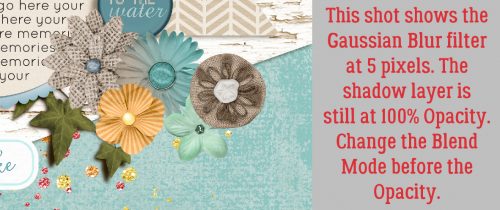
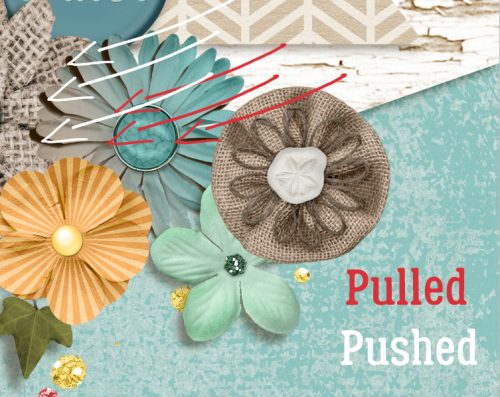
The trick to using the Smudge tool effectively without messing up (much) is to make use of the [ (smaller) and ] (larger) keys to grow or shrink your cursor, and to use the crosshairs inside the cursor as your reference point. Where you only want to move a very small area of your shadow, make your cursor small then position the crosshairs at the edge of the area you want to move. Using very slight movements, push or pull, depending on where you want to move the shadow – push close, pull away. Then when you’ve got what looks right to your eye, add your Gaussian Blur filter.

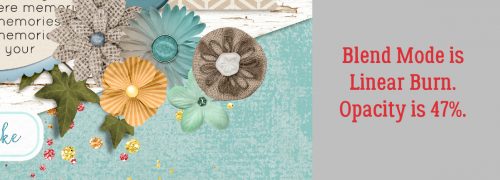
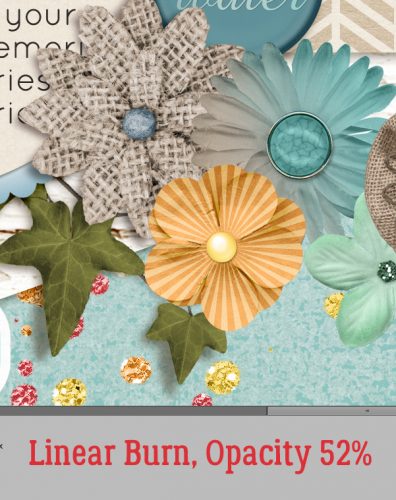
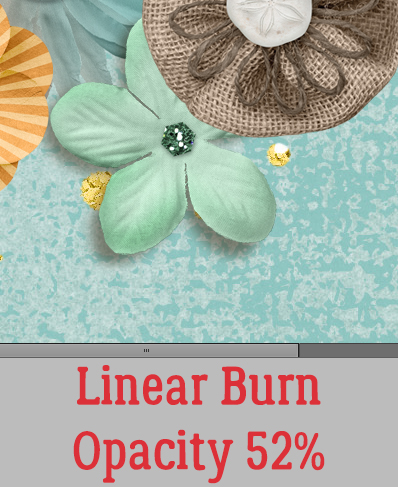
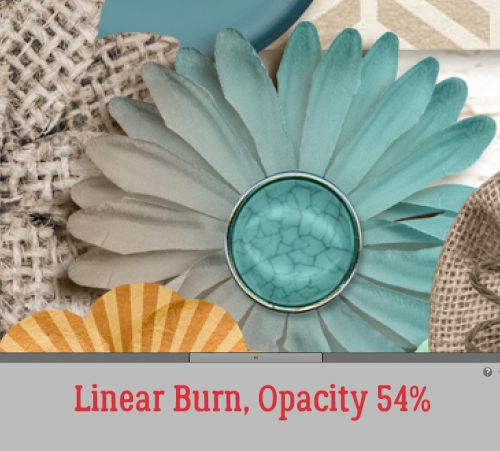
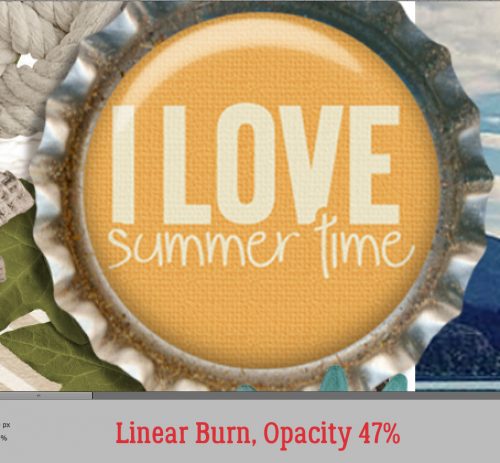
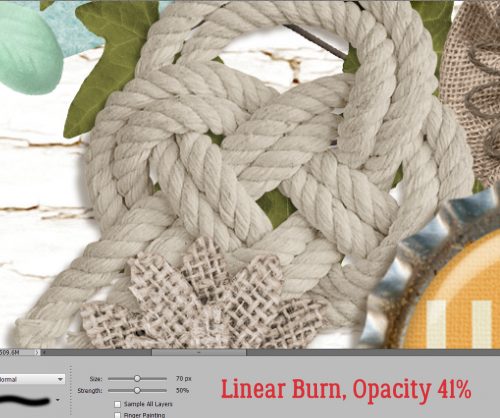
If you choose to change the Blend Mode to Linear Burn (or Multiply, Color Burn or whatever), make sure you do that before you decrease your Opacity. If you do it in reverse, next time you go to nudge an element with the Arrow keys, all that will happen is the software will scroll through the Blend Modes, not move your object!! (How do I know?? Lots of practice at CTRL/CMD>Z!!)

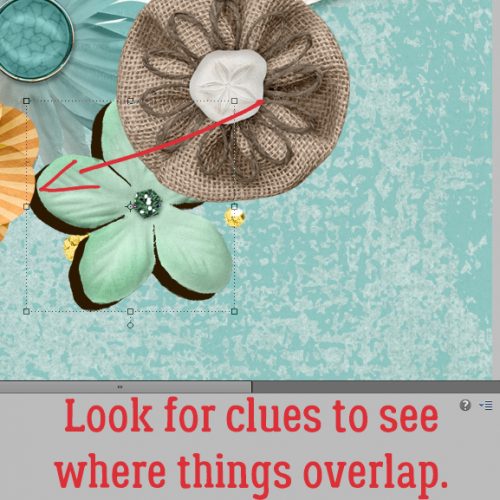
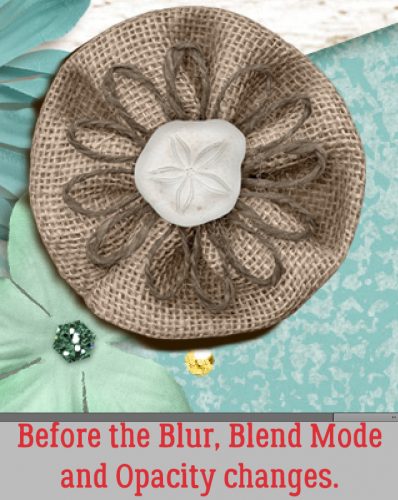
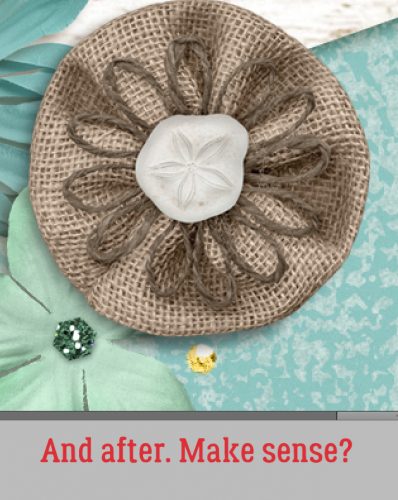
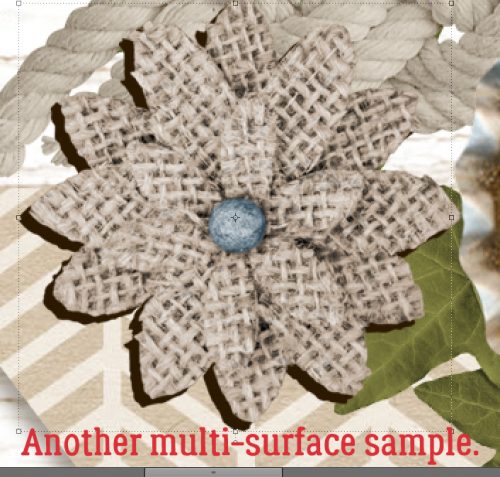
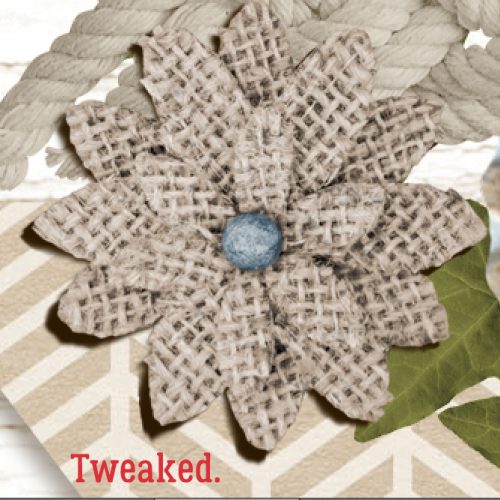
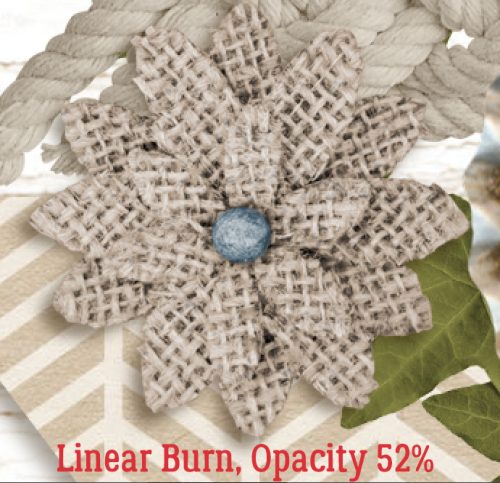
Let’s see what happens to this burlap flower. It’s overlapping the flair, some paper and a leaf.

I decided the burlap was quite stiff, so there wouldn’t be a lot of lift at the ends of the petals. It’s literally laying on top of the edge of the flair, so there isn’t much shadow cast there. But where it overlaps the leaf, I gave the petals just a hint of a curve.

The final shadow isn’t too obvious. I always look at the entire element when I’m adjusting the Opacity so I don’t lose it, but also to ensure it looks natural.

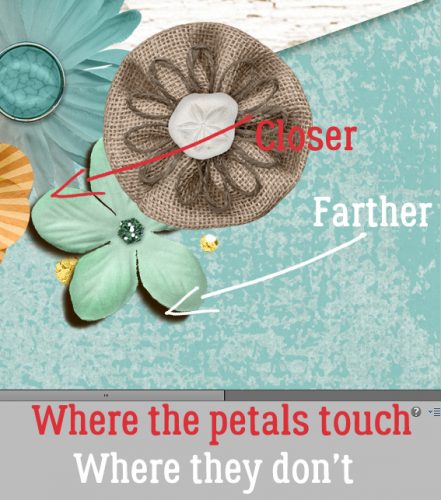
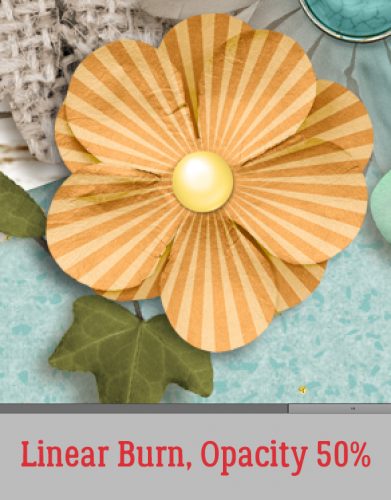
This little flower adds some new opportunities. The shadow should run under the gold flower, which is above it in the stack.

But the shadow should also be a bit closer to the petal itself where it overlays the bigger flower beneath it. Where the petals could be curved away from the paper, the shadow can be farther away.

Did you know that Elements will remember the settings you used for your Gaussian Blur filter? It’s a great step-saver when you’re shadowing a lot of similar things, like flowers and leaves, to use the keyboard shortcut CTRL/CMD>F – automatically blurring your shadow to the same amount as the previous one.

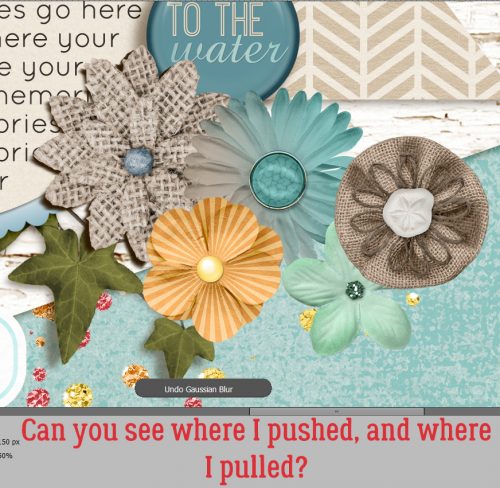
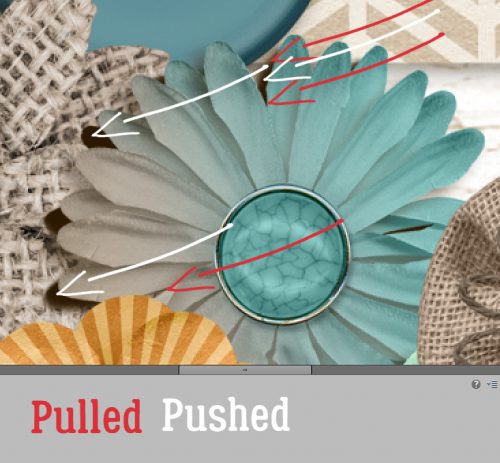
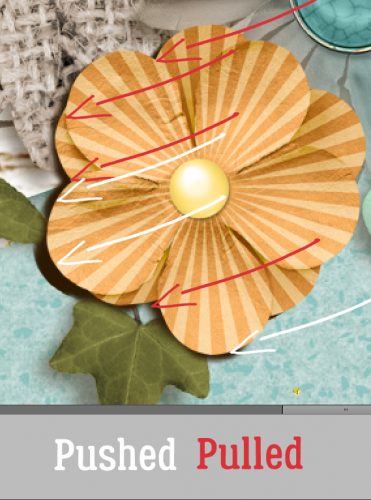
This is a tricky one. I put two flowers one on top of the other and rotated the top one to make the flower fuller. So there will also be two shadow layers. The shadow on the upper layer will be more visible, and will need a bit more pushing and pulling that the ones we’ve already looked at.

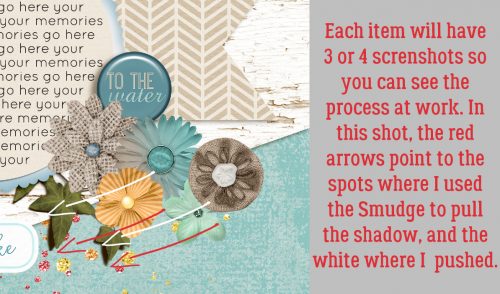
The white arrows show where I’ve used the Smudge tool to PUSH the shadow away from the centre while the red arrows show where I’ve PULLED the shadow toward the centre.

In this screenshot you can see the end result of the blur-blend-fade process for the topmost flower. And the shadow layer for the bottom is there too.

The burlap underneath could make demands, but nothing we can’t handle!

Done!

Again, the shadowing is subtle but effective.

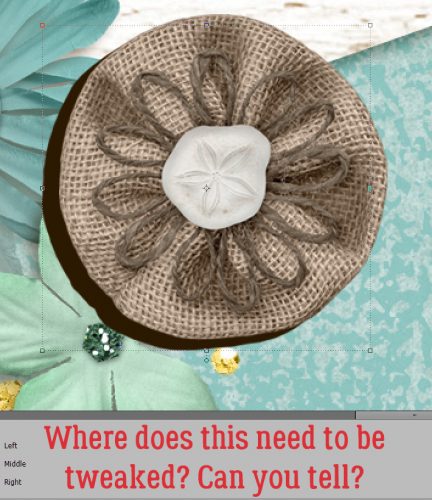
Now for the burlap rosette. It’s a softer-looking element than the multi-petaled burlap flower. See if you can figure out what I’m going to do to customize this one.

Did you figure it out? Are you starting to see how different objects will cast a different shadow?

There will be more depth to the shadow at the lower edge where there’s a gap created by the little aqua flower.

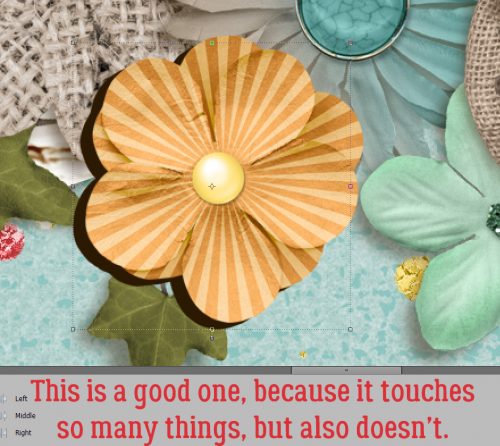
On to the gold flower. It’s overlaying several other objects.

Take a close look at where the shadow touches the leaf on the far left. See how I’ve brought the shadow in really close where it’s touching the leaf, but let it stay farther away where there’s a gap between the flower and the paper underneath?

Ta-da!

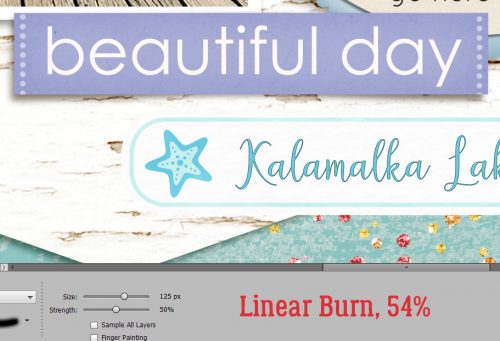
This one was an easy one. I pushed in close to the centre of the word strip to make it look glued down there but loose at the ends. Be sure to change the size of your Smudger to BIG when you’re curving paper like this so you get a smooth arc. I created a little mock-up of what the Smudge tool‘s cursor looks like. (Of course, it won’t be red when you’re working, it’ll be black.) Remember, the [ key makes your tool smaller, the ] makes it bigger. That crosshair is SO useful!

Blurred, blended and faded. Take note, the blur isn’t quite as soft here as it is with the flowers because the edges are sharper, so the shadow should be sharper. This one is 2.5 pixels.

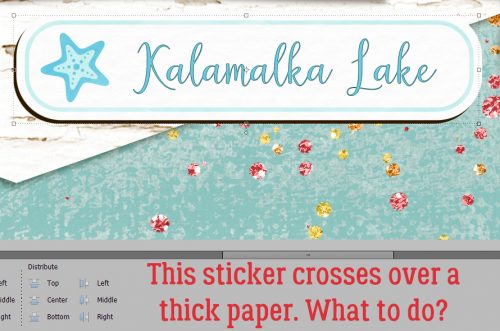
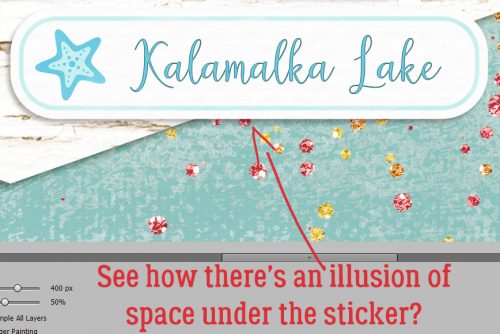
Ah yes, stickers! The shadow will be very tight, but there’s still room for some tweaking.

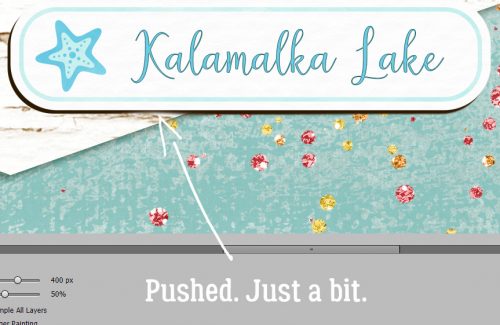
I pushed it a little closer where it’s crossing the edge of the thicker paper.

Now there’s a hint of distance where the sticker comes off the thicker paper. Subtle… When you see my finished layout in the Gallery you’ll see that I’ve also used the Burn tool to give the illusion of the edge of the thicker paper showing through onto the sticker itself.

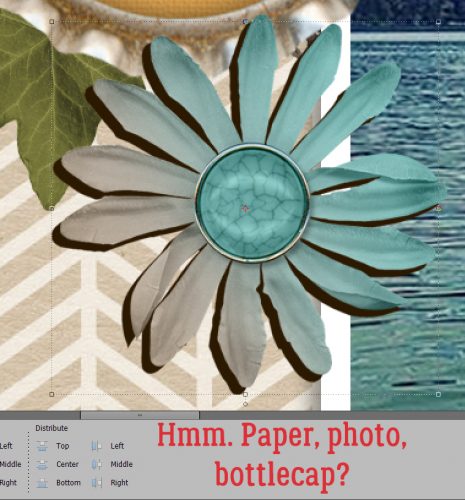
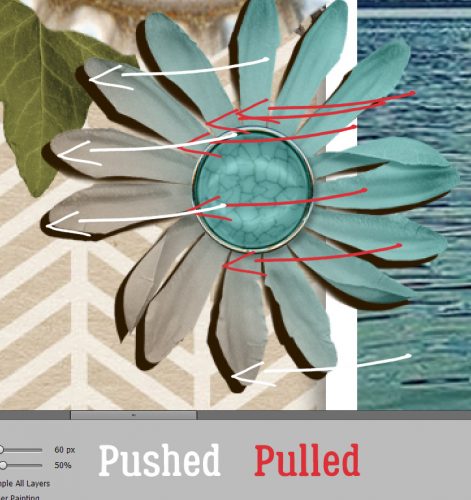
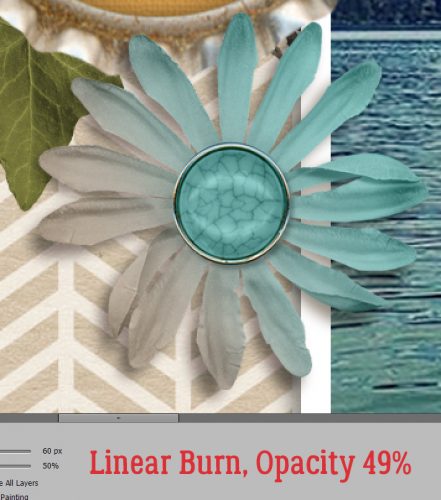
This one is a single layer of the aqua daisy. It’s got some challenges!

The white arrows show where I’ve PUSHED the shadow away from the centre, the red arrows where I’ve PULLED it toward the centre.

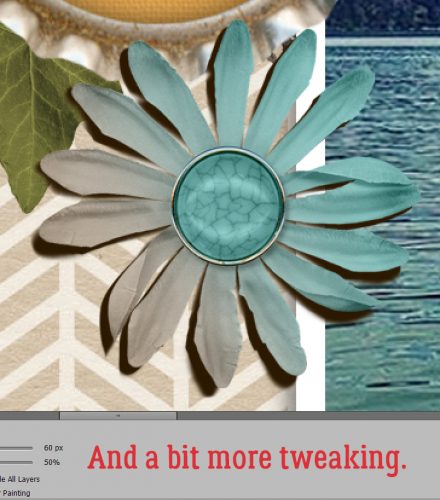
But wait! Where the ripples in the bottlecap touch the petal, the shadow has to be thinner. I [[[[ my cursor down to tiny to make this look more natural. Look too at the leaf.

Blur, blend, fade.

This is another challenge where the burlap petals touch the twine.

Again, I think the burlap has been stiffened a bit, so not a lot of curving petals.

I hope these examples are giving you some insight into how shadows are cast.

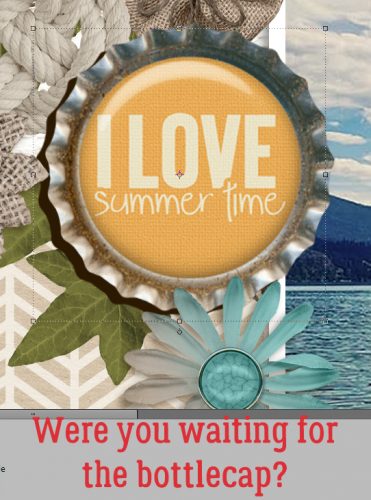
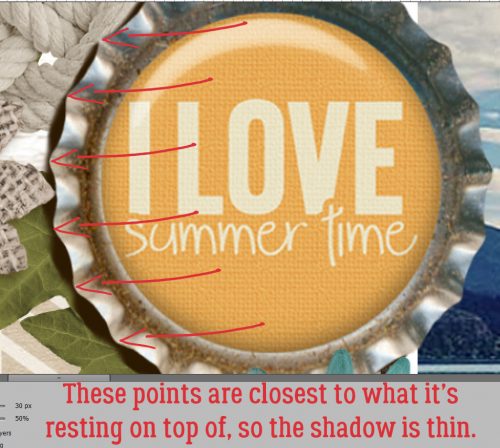
Did you think I’d leave out the bottlecap? Heck no!!

Where the crimps touch the object below, the shadow is thin, where the crimps curve away from the object below, the shadow bellies out a bit.

I love how this looks!

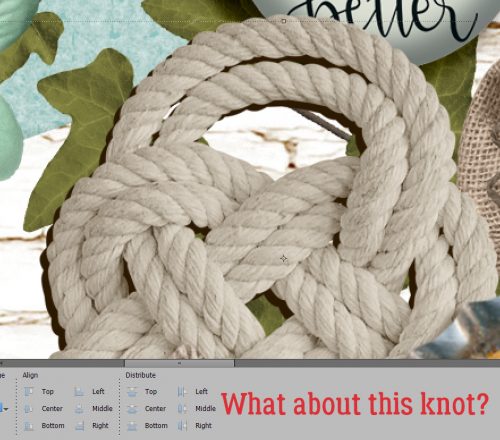
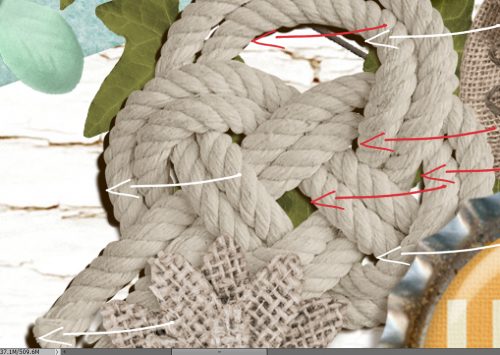
Last but not least, this knot needs attention. It’s a heavyweight, so the shadow won’t be too far away in most places, depending on what it’s touching.

White arrows – PUSHED away, red arrows – PULLED in.

And there you have it!

Do you think you’ll be ready to start creating your own custom shadows now? I hope so!!

(Credits are in the Gallery… too many different kits to list them all here!)

Fresh Baked: June 14, 2019

ZOMG! We’re officially halfway through the year! Surprised smile AND! To celebrate, we have a new designer joining us too!!
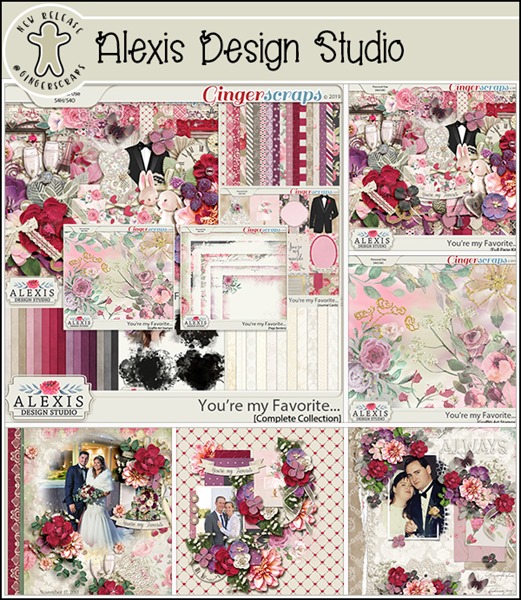
Alexis of Alexis Design Studio!

1
https://store.gingerscraps.net/Alexis-Design-Studio

We, as always, asked her for a little about herself, and this is what she had to share with us:

I started digital scrapbooking in 2009. My creativity developed as a result of a diverse career history, and, growing up with an incredibly creative grandmother. I began my career in the corporate world, and also worked extensively in the fashion world specializing in the cosmetic, bridal and modeling industries. I started my own jewelry company in 2004, and expanded to digital design shortly thereafter.
I left the corporate environment to follow my inner designer to influence both the fashion and digital scrapbook industry.
My scrapbook design style is elegant, traditional and rich in color. These products are developed to help you create your own memory keeping for many generations to come.
My designs are influenced by the beautiful nature that surrounds me in both the mountains of New York and also, Miami, where I currently live with my fiancé and our cherished Persian cats.

And here are just a few things available in her store:

2
https://store.gingerscraps.net/You-re-my-Favorite-Complete-Collection.html

3
https://store.gingerscraps.net/Brighter-Days-Ahead-Collection.html

4
https://store.gingerscraps.net/It-s-the-Little-Things-Collection.html

5
https://store.gingerscraps.net/Alexis-Design-Studio

Remember when you spend $10 in the store, you get a great new collab! There’s something about spring with that “old time” feel!

fwp_thumb_thumb
https://store.gingerscraps.net/GingerBread-Ladies-Collab-Farmhouse-Spring.html

6
https://store.gingerscraps.net/Smile-Power-Mini-Kit.html

7
https://store.gingerscraps.net/Everyday-memories-5.-Nature-lovers.html

8
https://store.gingerscraps.net/Read-All-About-It-Bundle-by-ADB-Designs.html

9
https://bit.ly/GingerScraps-ADBDesigns-HeritageResources

10
Collection: https://store.gingerscraps.net/Little-Bit-Country-Collection-by-Aimee-Harrison.html
Kit: https://store.gingerscraps.net/Little-Bit-Country-Page-Kit-by-Aimee-Harrison.html
Alphas: https://store.gingerscraps.net/Little-Bit-Country-Alpha-Sets-by-Aimee-Harrison.html
Borders: https://store.gingerscraps.net/Little-Bit-Country-Borders-by-Aimee-Harrison.html
Titles: https://store.gingerscraps.net/Little-Bit-Country-Titles-by-Aimee-Harrison.html
Plaids: https://store.gingerscraps.net/Little-Bit-Country-Plaid-Papers-by-Aimee-Harrison.html
Messy Edges: https://store.gingerscraps.net/Little-Bit-Country-Messy-Edges-by-Aimee-Harrison.html
Glitters: https://store.gingerscraps.net/Little-Bit-Country-Glitters-by-Aimee-Harrison.html

11
https://store.gingerscraps.net/Pennies-From-Heaven-BGD.html

12
https://store.gingerscraps.net/little-shark-by-Clever-Monkey-Graphics.html

13
Word Art and Flair Pack: https://store.gingerscraps.net/Travelogue-Kentucky-Word-Art-and-Flair-Pack-by-Connie-Prince.html
Bundle Pack: https://store.gingerscraps.net/Travelogue-Kentucky-Bundle-Pack-by-Connie-Prince.html
Kit: https://store.gingerscraps.net/Travelogue-Kentucky-Kit-by-Connie-Prince.html
Word Bits: https://store.gingerscraps.net/Travelogue-Kentucky-Word-Bits-by-Connie-Prince.html
Templates: https://store.gingerscraps.net/Travelogue-Kentucky-12×12-Temps-CU-Ok-by-Connie-Prince.html

14
https://store.gingerscraps.net/One-In-a-Melon-Templates-by-Dagilicious.html

15
https://store.gingerscraps.net/Happy-Home-Digital-Scrapbook-Kit-By-Dandelion-Dust-Designs.html

16
https://store.gingerscraps.net/JDoubleU-3-Templates-by-JB-Studio.html

17
Bundle: https://store.gingerscraps.net/My-Favorite-Guy-Bundle-by-JB-Studio.html
Elements: https://store.gingerscraps.net/My-Favorite-Guy-Elements-by-JB-Studio.html
Papers: https://store.gingerscraps.net/My-Favorite-Guy-Papers-by-JB-Sutdio.html
Ombré Papers: https://store.gingerscraps.net/My-Favorite-Guy-Ombr-Papers-by-JB-Studio.html

18
Bundle: https://store.gingerscraps.net/Best-Dad-Ever-Bundle.html
Kit: https://store.gingerscraps.net/Best-Dad-Ever-Kit.html
Cardstocks: https://store.gingerscraps.net/Best-Dad-Ever-Cardstocks.html
Wordart: https://store.gingerscraps.net/Best-Dad-Ever-Wordart.html

19
https://store.gingerscraps.net/Kristmess/

20
https://store.gingerscraps.net/Big-Wheels-Trio.html

21
https://store.gingerscraps.net/LDragDesigns/

22
https://store.gingerscraps.net/LDragDesigns/

23
https://store.gingerscraps.net/Templates-Hearts-2-by-Lindsay-Jane.html

24
https://store.gingerscraps.net/Templates-Mix-1-by-Lindsay-Jane.html

25
https://store.gingerscraps.net/Vacation-Album-Wanderlust-Templates-Album-by-Miss-Fish.html

26
https://store.gingerscraps.net/Blended-Clusters-2-Templates.html

27
https://store.gingerscraps.net/Summer-Breeze-Photo-Masks-by-Miss-Fish.html

28
Stamps – https://store.gingerscraps.net/Keep-your-memories-Stamps-Vol3.html
Stamps&Borders – https://store.gingerscraps.net/Keep-your-memories-Stamps-and-Borders-Vol3.html
Watercolor borders – https://store.gingerscraps.net/Keep-your-memories-Watercolor-Borders-Vol3.html
Grunge Photomasks – https://store.gingerscraps.net/Keep-your-memories-Grunge-Photomasks-Vol2.html
Masks&Frames – https://store.gingerscraps.net/Keep-your-memories-Masks-and-Frames-Vol3.html
Full Bundle (+FWP Pack) – https://store.gingerscraps.net/Keep-your-memories-Creative-Box3.html

29
Full Bundle – https://store.gingerscraps.net/Zoo-walking-Bundle.html
Kit – https://store.gingerscraps.net/Zoo-walking-Kit.html
Painted papers – https://store.gingerscraps.net/Zoo-walking-Painted-papers.html
Stamps – https://store.gingerscraps.net/Zoo-walking-Stamps.html
Photomasks – https://store.gingerscraps.net/Zoo-walking-Photomasks.html
QPs Set – https://store.gingerscraps.net/Zoo-walking-QPs-Set.html

30
https://store.gingerscraps.net/Who-Let-The-Dogs-Out-by-Scraps-N-Pieces.html

31
https://goo.gl/DQK8T

32
https://eepurl.com/gc31mP

g03_thumb_thumb
https://store.gingerscraps.net/KM-Ink-Digital-Designs

Remember, if you complete 10 challenges, just ten, you get a free kit as well!!

cr_thumb_thumb
Make a list, and check it off! Summer is ON!

Sneak Peeks June 13th 2019

Happy Thursday! We are a little over a week away from Summer! Our designers have some amazing kits to get us in that summer mood!

From Miss Fish

From Dagilicious

From Tinci

From Clever Monkey Graphics

Image may contain: one or more people

Image may contain: 1 person, smiling

From Down This Road

From JoCee

From Aimee Harrison

From JB Studio

From L Drag